Managers: Incident Reporting Process That Verifies Fixes in 30–90 Days
Christian MontenegroSeptember 4, 202618 min read
The incident reporting process is the formal workflow you use to capture facts about a workplace event, then trigger investigation, corrective action, and verification. If something just happened, your first job isn't paperwork. It's making sure everyone is safe, preserving the scene, and getting the report started while details are still fresh.
TL;DR:
- Near-misses provide critical predictive signals and should be actively reported and analyzed to prevent future injuries, yet many organizations overlook this data.
- Clear escalation criteria must be established in advance for events involving fatalities, hospitalizations, or safety threats, ensuring swift formal declaration when needed.
- Structuring investigation steps with assigned owners and verification deadlines reduces recurrence and enhances safety outcomes, rather than relying on informal follow-up.
- A culture that encourages non-punitive reporting and verifies corrective actions is essential to maintaining high incident reporting and effective safety improvements.
- Automating follow-up tasks and integrating incident data with operational goals helps sustain a reliable reporting process that leads to measurable safety progress.
Table of Contents
- What Does the Incident Reporting Process Actually Cover?
- What Types of Incidents Should Get Reported?
- How Do You Run the Incident Reporting Process Step by Step?
- Who Reports, Who Investigates, and Who Signs Off?
- What Fields Belong on Your Incident Report Template?
- How Do OSHA Timelines and Recordkeeping Rules Work?
- How Do You Know if Your Incident Reporting Process Is Actually Working?
- Making the Incident Reporting Workflow Actually Stick, Day to Day
- What Managers Consistently Get Wrong About Incident Reporting
- How Bossy Turns Incident Reporting Into a System That Runs Itself
- Sources
- FAQ
What Does the Incident Reporting Process Actually Cover?
An incident report and an incident management program are not the same thing, even though people use the terms interchangeably. The report is a single document capturing what happened. The management process is everything that happens after, from triage through root cause analysis to verified closure. Confusing the two is how organizations end up with filing cabinets full of reports and zero improvement in safety outcomes.
Scope matters here more than most managers realize. A genuine incident reporting process covers actual injuries and property damage, sure, but it also covers near-misses: the forklift that almost clipped someone, the frayed cable nobody flagged, the chemical spill that got mopped up before anyone got hurt. The Texas Department of Insurance's near-miss guidance makes a point worth repeating: near-miss data is often your best predictive signal for the incidents you haven't had yet. Ignore near-misses and you're only reacting after someone gets hurt, never before.
Why build this out formally instead of just "handling things as they come up"? Three concrete reasons show up across every serious incident management framework:
- Compliance. Regulators like OSHA require specific reporting and recordkeeping, and gaps create legal exposure.
- Trend analysis. A pattern of small equipment failures on one line tells you something a single report never will.
- Reduced recurrence. Every incident properly closed with a verified fix is one less repeat event, and repeat events are what actually drive up injury rates and insurance costs.
None of this requires enterprise software or a dedicated safety department. It requires a workflow everyone knows, uses, and trusts enough to actually report through.
What Types of Incidents Should Get Reported?
Most reporting failures aren't about willful concealment. They're about ambiguity. Frontline staff genuinely don't know whether something counts as reportable, so they shrug and move on. Fixing that ambiguity with clear categories does more for your reporting rates than any poster campaign.
Build your taxonomy around these core categories:
- Injuries and illnesses, from first-aid cases to lost-time injuries requiring medical treatment.
- Near-misses, where harm was possible but didn't occur.
- Hazardous conditions, like a blocked exit, exposed wiring, or a chemical stored incorrectly.
- Equipment failures, including malfunctions that didn't cause injury but easily could have.
- Security and data incidents, from a break-in to a lost device containing customer records.
- Environmental releases, such as spills, leaks, or unauthorized discharges.
Give frontline teams a simple decision rule: if it caused harm, could have caused harm, or violated a written safety or security standard, it gets reported. No exceptions for "it was minor" or "nothing actually happened." The whole point of near-miss and hazardous-condition reporting is catching problems before they become injuries.
Some events need to escalate immediately into a formal incident declaration rather than sitting in a routine queue. CISA's Cyber Resilience Review guidance recommends defining declaration criteria in advance: severity thresholds, regulatory triggers, or anything involving a fatality, hospitalization, or active safety threat. Decide those thresholds before you need them, not while you're standing in the middle of one.
How Do You Run the Incident Reporting Process Step by Step?
Every credible incident framework, from NIST's computer security incident handling model to ENISA's incident management guide, follows the same basic shape: detect, register, triage, investigate, act, verify, close. The details change depending on whether you're handling a slip-and-fall or a data breach, but the skeleton holds across industries.
1. Immediate response and intake. The first few minutes matter most. Get anyone injured medical attention. Secure the area so the scene isn't disturbed, and if equipment is involved, tag it out of service. Then start the intake report, ideally within the hour, through whatever channel is fastest for the person reporting: a mobile app, a hotline, a paper form pinned to the breakroom wall. Speed matters more than polish at this stage. You can always add detail later; you can't recover a scene that's already been cleaned up or a witness who's gone home and forgotten half of what they saw.
2. Capture the minimum viable report. At intake, you need the reporter's name (or anonymous flag), date and time, exact location, a factual description of what happened, names of witnesses, and any immediate actions already taken. Photos help enormously and cost nothing to collect if someone has a phone in their pocket, which is nearly everyone now.
3. Triage by severity. Not every report needs the same response speed. A near-miss with no injury potential above minor can wait for the next daily review. A hospitalization, a security breach involving customer data, or anything with regulatory reporting deadlines attached needs a response within hours, not days. ENISA's framework calls this stage "registration and triage," and it's the point where you decide who owns the investigation and how fast it needs to move.
4. Investigate and find the root cause. This is where most organizations either do the work properly or quietly skip it. OSHA's four-step investigation approach calls for preserving the scene, collecting information through interviews and physical evidence, determining root causes, and only then moving to corrective action. Skipping straight to "the employee should have been more careful" isn't a root cause. It's a shortcut that guarantees the same incident happens again in six months with a different employee. Structured techniques like the 5 Whys or a fishbone diagram force you past the obvious surface explanation and into the systemic issue, whether that's a missing guardrail, unclear training, or a schedule that leaves nobody covering a critical check.
5. Assign corrective actions with real ownership. A corrective action without an owner and a deadline is a suggestion, not a fix. Every action item needs a named person, a specific due date, and a way to confirm it actually happened, whether that's a photo of the new guardrail installed or a signed-off training log.
6. Close and verify. This is the step almost everyone rushes or skips outright. Closing an incident properly means implementing the fix, then monitoring for a defined window, commonly 30 to 90 days, to confirm the root cause hasn't reappeared before you mark it done. OSHA's recordkeeping regulation treats this verification period as part of proper closure, not an optional extra step.
Pro Tip: Set a calendar reminder for your verification window the same day you assign a corrective action, not the day you close the ticket. If you wait until closure to think about verification, you'll forget the window exists.
Here's the full sequence laid out as a checklist you can adapt:
- Secure the scene and address immediate safety needs.
- Submit an initial report within the hour through your fastest channel.
- Triage severity and assign an owner.
- Investigate using structured root-cause methods, not guesswork.
- Assign corrective actions with names and deadlines.
- Monitor for the verification window before final closure.
- Document the verified outcome in your recordkeeping system.
Who Reports, Who Investigates, and Who Signs Off?
Ambiguity about roles kills reporting programs faster than almost anything else. If nobody knows whose job it is to actually look into a near-miss report, it sits unopened in a queue until someone finally deletes it during a spring cleaning of the shared drive.
Four roles need clear definition, even in a small operation:
- The reporter. Anyone who witnesses or is involved in an incident. This should be every employee, not just supervisors, and anonymous submission should be an option for sensitive cases.
- The supervisor. Reviews the report within a set window, confirms immediate safety actions were taken, and routes it for investigation.
- The investigator. Conducts the root-cause work: interviews, evidence review, and documentation. For low-severity events this might be the same supervisor; for serious ones, it should be someone with actual investigation training.
- The incident lead. For higher-severity events, a designated lead coordinates across departments, communicates with stakeholders, and has authority to declare an incident formally under your pre-set criteria.
Decide in advance when a routine report escalates into something requiring a full incident management team. A single minor near-miss doesn't need a cross-functional group. A hospitalization, a data breach, or a pattern of three similar equipment failures in a month absolutely does.
Training and record retention responsibilities need an owner too, usually whoever runs operations or safety. Under OSHA rules, records must be kept for five years for injury and illness records.
What Fields Belong on Your Incident Report Template?
A report template that's too sparse gives investigators nothing to work with. One that's too long gets abandoned halfway through by a reporter standing in a loading dock trying to finish it on a phone. The right template balances both.
Essential fields, the ones you should never make optional:
- Reporter name (or anonymous flag) and contact information.
- Exact date and time of the incident.
- Precise location, not just "warehouse" but "warehouse, aisle 4, near loading door 2."
- Nature and severity of any harm, including near-miss classification.
- Names of witnesses present.
- Photos or media documenting the scene.
- Immediate actions already taken before the report was filed.
Optional fields that pay off enormously in trend analysis but shouldn't block submission if left blank: equipment ID number, shift and time of day, specific task being performed, and level of direct supervision present at the time. Healthcare incident reporting literature backs this pattern strongly, noting that factual, structured fields captured close to the event produce far more useful data than narrative reports written days later from memory.
Keep one master version of your template and retire old copies the moment you update it. Mismatched versions floating around different departments is a quiet, common way that data fields go missing from your trend analysis six months down the line.
How Do OSHA Timelines and Recordkeeping Rules Work?
If you operate in the United States, specific clocks start ticking the moment a serious incident occurs, and missing them carries real regulatory consequences.
Reporting deadlines that don't move: OSHA requires employers to report a workplace fatality within 8 hours, and any hospitalization, amputation, or loss of an eye within 24 hours of learning about it.
Beyond the immediate reporting window, OSHA also sets a documentation deadline for the paperwork itself. Employers who meet OSHA's criteria must complete Form 301 or an equivalent incident report within seven calendar days of receiving notice that an event is recordable. That form feeds into the broader Form 300 injury and illness log that most covered employers maintain annually.
A few practical rules worth locking into your process:
- Coverage generally applies to employers above a certain size threshold, with partial exemptions for specific low-hazard industries, so check your NAICS classification against OSHA's exemption list rather than assuming you're covered or excluded.
- Records need to be retained for several years after the year they relate to, and the annual Form 300A summary must be posted during the first part of the year in a visible workplace location.
- Fatality and severe-injury reporting deadlines apply regardless of company size or exemption status; there's no small-business carve-out for the 8-hour and 24-hour clocks.
If you operate outside the United States, these specific deadlines don't apply to you, but the underlying principle does: nearly every jurisdiction with occupational safety regulation sets its own mandatory reporting windows and recordkeeping duration. Check with your local labor or safety regulator directly rather than assuming U.S. timelines translate. For organizations juggling incident reporting alongside broader compliance obligations, like sustainability or governance disclosures, it's worth reviewing how reporting deadlines and phase-in requirements stack across your full regulatory calendar so nothing slips through unnoticed.
How Do You Know if Your Incident Reporting Process Is Actually Working?
A reporting process that generates paperwork but never changes outcomes isn't working, no matter how organized the filing system looks. Measuring effectiveness means tracking both the numbers and the culture underneath them.
Track these quantitative markers monthly:
- Report rate, including near-misses specifically, since a low near-miss count usually signals underreporting rather than genuine safety.
- Time-to-triage, how long between submission and severity classification.
- Time-to-close, from report to verified corrective action.
- Recidivism rate, how often the same root cause reappears after a fix was marked complete.
- CAPA completion rate, the percentage of corrective actions finished by their assigned deadline.
Numbers alone miss half the picture. Investigation depth matters too: are root-cause findings specific and systemic, or do they keep landing on "employee error" as a catch-all? That pattern is usually a sign investigators are rushing or under pressure to close cases fast. Employee trust matters just as much. If workers believe reporting a near-miss gets them blamed instead of thanked, your report rate will quietly decline even while your actual incident rate stays flat or climbs. Periodic audits comparing report volume against known incident patterns, plus a straightforward anonymous survey asking staff if they trust the process, will tell you more than any dashboard.
Making the Incident Reporting Workflow Actually Stick, Day to Day
Most incident reporting processes fail not at the design stage but at the follow-through stage. Someone writes a great policy, prints a checklist, and six months later corrective actions are sitting unverified because nobody had a reliable way to track them.
Recurring checklists solve the part of this problem that trips up the most teams: making sure the investigation and corrective-action steps actually happen in order, every time, instead of depending on someone's memory. Task assignment with a due date and an owner turns "someone should fix that guardrail" into a specific person's job with a deadline attached, and photo verification confirms the fix was made rather than just marked complete on a form. That closes the exact gap OSHA's guidance flags around verifying corrective actions before final closure.
Analytics dashboards that roll incident data up against your broader operational goals turn a stack of individual reports into a trend you can act on, which is the whole point of cascading goals in the first place: connecting a daily task like "complete the equipment safety check" to a measurable outcome like "reduce equipment-related near-misses this quarter."
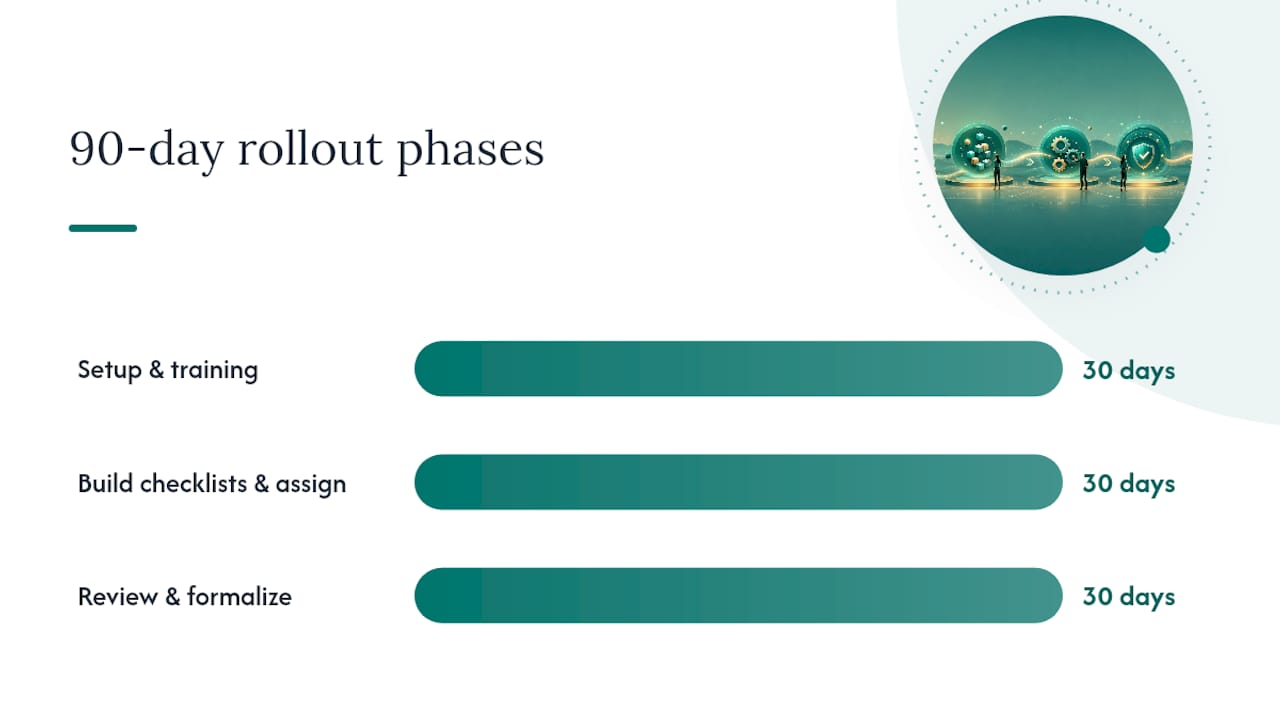
A high-level rollout, spread across three months, looks something like this:
- Days 1 to 30: Define your report template, categories, and escalation thresholds. Train frontline staff on how and when to report.
- Days 31 to 60: Build recurring checklists for investigation steps and corrective-action verification. Assign clear ownership for every open action.
- Days 61 to 90: Review your first full month of data, adjust triage rules based on what actually came in, and formalize your audit cadence.
Pro Tip: Don't wait for a serious incident to test your process. Run a near-miss report through the full workflow, intake to verified closure, during your first 30 days so you catch gaps in ownership or timing before they matter.
What Managers Consistently Get Wrong About Incident Reporting
The technical parts of incident reporting, the forms, the timelines, the taxonomy, are the easy part to get right on paper. The part that actually determines whether a program works is almost entirely cultural, and it's the part most managers underinvest in.
Closing the loop on corrective actions is the single most neglected step in the entire process. Teams are generally good at capturing the initial report and even decent at assigning a fix. Where things fall apart is the verification window, the 30 to 90 days after a fix is implemented where someone is supposed to confirm the root cause actually stopped recurring. Skip that step and you get a false sense of resolution: the ticket says "closed," but nobody actually checked.
The second failure point is blame. If reporting a near-miss gets someone a talking-to instead of a thank-you, reporting rates collapse within weeks, and they collapse quietly, so managers don't notice until an incident that should have been predictable blindsides them. A non-punitive reporting culture isn't a soft HR preference. It's the mechanism that keeps your predictive data flowing.
For small and mid-size frontline teams without a dedicated safety department, the fix isn't more paperwork. It's building verification into your existing task and scheduling systems so it happens automatically instead of depending on someone remembering three months later.
— Christian
How Bossy Turns Incident Reporting Into a System That Runs Itself
For teams juggling frontline schedules and daily operations, the gap in incident reporting usually isn't the intake form. It's what happens after: making sure the corrective action actually gets done and someone confirms it worked. Bossy closes that gap by turning each investigation step and follow-up fix into an assigned, verifiable task instead of a line item that quietly stalls.

Recurring checklists keep your investigation steps consistent across every location and every shift, so the process doesn't depend on one person's memory. Task assignment with photo verification confirms corrective actions were actually completed, not just marked done, which directly addresses the closure and verification gap most reporting programs never solve. Analytics dashboards then roll that incident data into the same view as your broader operational goals, so a spike in near-misses on one shift becomes visible instead of buried in a spreadsheet nobody reopens.
If your team has outgrown paper checklists and group chats for tracking corrective actions, take a look at Bossy's features for tasks, scheduling, and inventory or explore the full range of operational problems Bossy solves for frontline teams. You can also see how it fits restaurant operations specifically if that's your industry. Getting started takes minutes, and the first checklist you build could be your incident verification workflow.
Sources
For U.S. recordkeeping requirements and mandatory reporting forms, start with OSHA's recordkeeping guidance and its Form 301/300 forms package. For structured investigation methodology, OSHA's four-step incident investigation guide is worth keeping on hand.
If your organization handles security or data incidents alongside physical safety events, NIST SP 800-61 Revision 3 and the ENISA Incident Management Guide both offer detailed lifecycle frameworks and checklist templates worth adapting to your own workflow.
- NIST Special Publication 800-61 Revision 3, Computer Security Incident Handling Guide
- ENISA Incident Management Guide
FAQ
What Are the Five Rules of Incident Reporting?
Definitions vary by industry, but a widely used version covers: report immediately, report accurately, report every incident including near-misses, preserve evidence before it's disturbed, and follow up until corrective action is verified.
What's the Difference Between a Near-Miss and an Incident?
A near-miss is an event where harm was possible but didn't happen, while an incident typically involves actual injury, damage, or loss; both should be captured, since near-miss data often predicts future incidents.
How Long Does an Employer Have to Report an Injury to OSHA?
In the U.S., employers must report a fatality within 8 hours and a hospitalization, amputation, or loss of an eye within 24 hours of learning about it.
Who Should Investigate a Workplace Incident?
A supervisor can typically investigate minor events, but serious incidents need a trained investigator or an incident lead with the authority to coordinate across departments and access relevant records.
Can Employees Report Incidents Anonymously?
Yes, and offering an anonymous reporting channel is a widely recommended best practice for increasing near-miss and hazardous-condition reporting rates, particularly in workplaces where trust in a non-punitive process is still being built. Tools with task and communication features can support anonymous or supervisor-mediated reporting workflows alongside your existing checklist system.