10 Step Inventory Cycle Count Playbook for Managers
Christian MontenegroSeptember 3, 202615 min read
A cycle count is a recurring inventory audit that checks a small slice of your stock on a repeating schedule, instead of shutting down operations for one massive annual count. It keeps your ERP or WMS numbers honest year round. Warehouses, retail chains, distribution centers, and 3PLs use it because it catches problems early, without ever pulling the whole team off the floor.
TL;DR:
- Regular cycle counting improves inventory accuracy to around 97%, especially when implementing blind counts and frozen zones during the process.
- Counting frequency should align with item value and turnover, with A items weekly to monthly, B items monthly to quarterly, and C items twice a year, plus event-driven triggers.
- Using a mobile app or barcode scanner for blind counts and automated variance flagging reduces errors and speeds up reconciliation.
- Systematic processes, including independent recounts and reason codes, help detect theft, mispicks, and paperwork lag that cause variances.
- Tracking variance rates over time exposes ongoing process issues, making the first 90 days critical for establishing discipline and long-term accuracy.
Table of Contents
- What Is an Inventory Cycle Count, Exactly?
- The Real Benefits of Routine Cycle Counts
- Which Cycle Counting Method Fits Your Inventory?
- How to Run a Cycle Count, Step by Step
- How Often Should You Cycle Count Inventory?
- What Tools Do You Actually Need?
- Why Variance Happens, and How to Stop It
- Building Your Cycle Count Program: A Starter Checklist
- How Bossy Supports Auditable Counts
- The First 90 Days Matter More Than the First Count
- Make Cycle Counts Part of the Daily Routine, Not a Special Event
- Sources
- FAQ
What Is an Inventory Cycle Count, Exactly?
Think of it as ongoing maintenance instead of a once-a-year overhaul. A full physical inventory count freezes the whole warehouse, usually once a year. Every single SKU can be counted and reconciled at once. Cycle counting spreads that same work across the calendar, counting a rotating subset of locations or SKUs on a set rhythm so the whole catalog gets covered over weeks or months.
A few terms come up constantly once you start running counts, so it helps to nail them down. SKU is your stock keeping unit, the specific item and variant you're tracking. Location is the bin, shelf, or zone where that SKU lives. On-hand is what the system thinks you have; available subtracts anything already allocated to an order. A blind count means the counter doesn't see the system's expected quantity before counting, which stops them from unconsciously counting to match it. Variance is simply the gap between what the count found and what the system expected.
Cycle counting works best when accuracy matters continuously, not just at tax time. Retailers with fast-moving SKUs, 3PLs juggling multiple client inventories, and warehouses running lean staffing all lean on it. Full physical counts still have a place, particularly around financial year-end reporting, where government stocktake guidance recommends planning ahead and timing the count near the close of the income year for tax purposes.
The Real Benefits of Routine Cycle Counts
The biggest win isn't the count itself. It's what stops happening once you count regularly: fewer surprises, fewer emergency reorders, fewer angry customers staring at a "sold out" message for an item your system swears is in stock.
Here's what changes when cycle counting becomes routine:
- Accuracy climbs and stays up. Warehouses that run a disciplined count workflow, including frozen zones and blind counts, tend to land around 97% inventory accuracy, compared to roughly 83% at operations that skip those controls.
- Downtime drops. You never shut the building down; counts happen in rotation while everything else keeps moving.
- Cash stops getting stuck. Fewer overstock surprises and fewer stockouts mean money isn't tied up in inventory you didn't know you had, or missing on orders you didn't know you'd need.
- Shrinkage gets caught faster. A count that finds a pattern of missing units in one zone flags a theft or process problem months before an annual count would.
Pairing cycle counts with a perpetual inventory system, where the software tracks quantity in real time between counts, turns each count into a quick accuracy check rather than a full rebuild, according to RSM's guidance on effective stocktakes. That's the difference between a ten-minute spot check and a half-day scramble.
Which Cycle Counting Method Fits Your Inventory?
Not every warehouse should count the same way. The method you pick should match how your inventory actually behaves, not what a template says.
- ABC/Pareto counting. Split SKUs into A, B, and C tiers by value or usage volume, using the classic Pareto idea that a small share of items drives most of the value. Count A items weekly or monthly, B items monthly or quarterly, and C items a couple of times a year. This is the most widely used cycle counting method because it puts your attention where the financial risk actually sits.
- Usage or touch-frequency counting. Count whatever gets picked, moved, or handled most, regardless of dollar value. This works well in operations where high-touch items generate the most handling errors, even if they're cheap.
- Random sample counting. Pull a random selection of SKUs or locations for counting, useful as an unbiased control group to test whether your overall accuracy assumptions hold up.
- Location or zone counting. Sweep a physical area, aisle by aisle or bin by bin, rather than chasing specific SKUs. This catches misplaced stock that SKU-based methods miss entirely.
- Statistical process control. For high-volume operations, sample a statistically valid subset and use the variance rate to infer accuracy across the whole population, cutting the labor of counting everything without sacrificing confidence in the numbers.
Pro Tip: Run a small control group of SKUs through intensive daily counts for two to four weeks before rolling out a full program. It's the fastest way to expose gaps in your procedure, and you can use what you learn to set realistic recount tolerances and reason codes before scaling up.
How to Run a Cycle Count, Step by Step
Counting inventory without a defined process just produces numbers nobody trusts. The workflow below borrows heavily from operational playbooks that high-accuracy warehouses actually run, and it holds up under real-world interruptions like a forklift blocking a bin or a shift change mid-count.
- Select what to count using documented triggers. Don't count randomly. Use last-count age, variance history, and sales velocity to decide what's due. Event triggers matter too: a fresh receipt or a location dropping below its low-stock threshold both justify an unscheduled count.
- Freeze movement in the count zone. Stop picks, put-aways, and transfers in that location before anyone touches a clipboard or scanner. Counting a moving target guarantees a wrong answer.
- Snapshot the system quantity. Record exactly what your ERP or WMS says is on hand at the moment of the freeze, so you have a clean baseline to compare against.
- Assign counters and count blind. The counter should not see the expected system quantity before counting. Blind counting removes the unconscious pull to just confirm what the screen says. This is the single highest-leverage discipline in the whole process.
- Capture the count on a mobile device. Scanning barcodes and entering counts directly into a mobile app cuts transcription errors that paper sheets almost always introduce.
- Flag variances against a set tolerance. A small rounding difference doesn't need escalation. Anything past your defined threshold does.
- Require an independent recount. A second, different counter checks any flagged variance, blind again, before anyone assumes the first count was wrong.
- Investigate before adjusting anything. Check for open transactions, overflow bins, unit-of-measure mismatches, or a simple mis-scan before touching the system quantity. A lot of "shrinkage" turns out to be a case of pallets counted in eaches instead of cases.
- Apply the adjustment with a reason code. Every correction gets a documented reason: damage, mis-pick, theft, data entry error, whatever actually happened.
- Log the full audit trail. Counter ID, timestamps, before and after quantities, and the reason code all get recorded, so the count can be reviewed or defended later.
Systems like Dynamics 365 formalize this into three stages under the hood: creating cycle counting work, processing the count, and resolving differences, with pending-review queues for anything that needs a human decision before the system quantity changes.
How Often Should You Cycle Count Inventory?
Cadence should follow risk, not a calendar habit. Your A items, the ones that carry the most value or move the fastest, deserve the tightest attention.
- A items: count weekly to monthly, depending on volume and value concentration.
- B items: count monthly to quarterly.
- C items: count quarterly to twice a year.
Beyond the fixed calendar, build in event-driven triggers that force a count outside the normal rotation:
- A large receipt just landed and needs verification before it's trusted in the system.
- A location's quantity dropped below a low-stock threshold, which is often when discrepancies surface.
- A SKU has a history of repeat variances and needs closer monitoring than its ABC tier alone would suggest.
For scheduling mechanics, rolling coverage, where a fixed number of locations get counted every day so the full warehouse cycles through over a set period, tends to spread labor more evenly than batch counting everything at once. RSM's stocktake research also points to scheduling counts during quieter operational periods to cut disruption, and setting a minimum days-between-counts rule keeps the same zone from getting hit twice in a short window while others go untouched.
What Tools Do You Actually Need?
Barcode scanning covers most operations well and costs far less than RFID to deploy. RFID earns its price tag in high-volume, high-value environments where line-of-sight scanning slows things down or where tags can be read in bulk without individually pointing a scanner at each item.
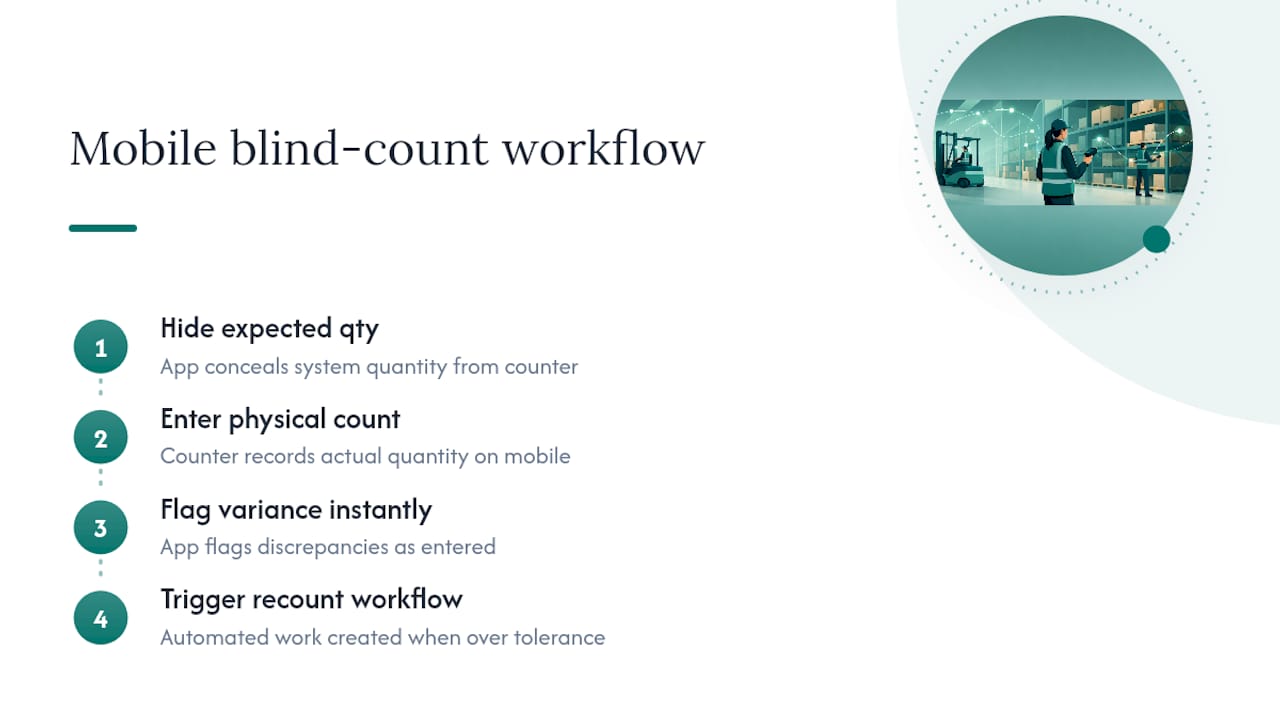
Mobile audit apps are where blind counting actually becomes practical at scale. A good app hides the expected quantity from the counter, flags variances the moment they're entered, and routes anything over tolerance straight into a recount workflow, which is exactly the kind of mobile blind-count functionality modern WMS platforms build around.
When evaluating a WMS or ERP for cycle counting, look for count plans you can schedule in advance, configurable variance thresholds, automated work creation when a trigger fires, and a built-in audit trail that logs counter ID, timestamps, and reason codes without extra manual entry.
Manual, paper-based counts still work for smaller operations, as long as you build the same controls into the paperwork: a documented reason-code list, a signature field for the recount, and a clear timestamp on every sheet.
Why Variance Happens, and How to Stop It
Variance almost always traces back to a handful of repeat offenders. Paperwork lag, where a transaction hasn't been entered into the system yet when the count happens, is one of the most common. Items stored in multiple locations get double-counted or missed entirely. Unit-of-measure mismatches, cases counted as eaches or vice versa, throw off totals fast. Mis-picks and, less often, theft round out the list.
Mitigations that actually move the needle:
- Write SOPs that specify exactly how counting, receiving, and put-away should happen, so variance isn't a matter of individual habit.
- Keep blind counting mandatory, not optional, even when the team is confident in the number.
- Require a documented reason code on every adjustment, since reason codes turn counting into a feedback loop that fixes upstream processes instead of just patching the number.
- Audit overflow bins and mis-labeled locations on a regular schedule, not just when a count flags them.
Pro Tip: Track variance rate by SKU over time, not just per count. A SKU that shows up in three consecutive variance reports isn't bad luck. It's a process problem hiding in plain sight, and the reason codes will usually tell you exactly where.
Building Your Cycle Count Program: A Starter Checklist
A cycle counting program works best as a pilot first, not a company-wide mandate on day one. Nail the policy and prove it on a small scale before scaling.
Policy elements to define first:
- Scope: which locations, SKUs, or zones are in the program.
- Cadence: your A/B/C schedule plus event triggers.
- Tolerance: the variance threshold that forces a recount.
- Reason codes: a fixed list everyone uses consistently.
- Approval rules: who signs off on adjustments above a certain dollar value.
Operational items to lock down:
- Tools: barcode scanners, mobile app, or paper backup with the same controls built in.
- Counters: assigned roles, ideally rotating so no one person always counts the same zone.
- Freeze and snapshot rules: exactly how movement gets stopped and the system quantity captured.
- Recount thresholds: what triggers a second, independent count.
Roll it out in stages: pilot on a control group of SKUs, measure the variance and time-to-count, refine your tolerances and reason codes based on what you find, train the wider team on the finalized procedure, then scale to full coverage.
How Bossy Supports Auditable Counts
The hardest part of cycle counting usually isn't the math. It's proving the count actually happened the way it was supposed to. Task verification tools, the kind that require photo proof or a manager approval step before a task counts as done, apply directly to count zones: a counter can't mark a bin "counted" without evidence attached.
Inventory controls that track stock counts, ordering, and transfers in one place also close the gap between the count and the audit trail. When adjustments, reason codes, and timestamps all live in the same system your team uses for daily tasks, you're not stitching together a spreadsheet after the fact. You're logging the audit trail as the count happens.

The First 90 Days Matter More Than the First Count
Watch your variance rate closely in the first three months, not the accuracy percentage. A dropping variance rate tells you the process is working; a flat accuracy number in month one means nothing yet. The cultural shift that locks in discipline is smaller than people expect: get counters comfortable saying "I don't know, let's recount" without treating it as a failure. That single habit does more for long-term accuracy than any tooling decision. Use every investigation as a chance to fix the upstream process, not just the number on the screen.
— Christian
Make Cycle Counts Part of the Daily Routine, Not a Special Event
Most cycle count programs fail quietly, not because the method is wrong, but because nobody can prove the count happened the way it was supposed to. Some operations platforms build that proof into the daily workflow instead of bolting it on afterward: task verification with photo proof means a counter can't mark a bin done without evidence, and inventory controls for stock counts, ordering, and transfers keep the whole audit trail in one place instead of scattered across spreadsheets.

For retail teams juggling multiple locations, the retail-specific tools map count zones directly to daily task lists, so a cycle count schedule doesn't compete with everything else on a manager's plate. If you're running a warehouse, distribution operation, or multi-location retail chain and want to see exactly how task verification and inventory tracking fit your count cadence, check the full feature set or start with Bossy directly to see what a rollout would look like for your team.
Sources
For deeper process detail, Microsoft's Dynamics 365 documentation covers WMS configuration, and business.gov.au's stocktake guidance covers year-end reporting obligations. Service businesses outside traditional warehousing can adapt similar controls using resources like Throughline Automation's professional services automation guidance.
- Cycle counting in Warehouse management - Microsoft Learn
- How to Do a Cycle Count in a Warehouse: Step-by-Step Process for Operations Teams — Stockount
- Business
- Effective stocktakes: Reduce risk, boost accuracy — RSM
- Cycle count — Wikipedia
FAQ
How Is a Cycle Count Actually Counted?
A counter (ideally without seeing the system's expected quantity) physically counts a selected SKU or location, enters the number through a mobile app or paper sheet, and any variance beyond your set tolerance triggers an independent recount before adjustment.
How Do You Calculate Cycle Inventory?
Cycle inventory generally refers to the portion of stock that cycles between replenishment orders based on order quantity and demand rate; for cycle counting purposes, the "count" itself is simply the physical quantity found in a location compared against the system's on-hand figure to produce a variance.
How Often Should You Cycle Count Inventory?
It depends on the item tier: A items typically get counted weekly to monthly, B items monthly to quarterly, and C items quarterly to twice a year, with event triggers like large receipts or low-stock thresholds forcing additional counts outside that schedule.
Can Software Like Bossy Handle Cycle Count Verification?
Yes. Task verification with photo proof and built-in inventory controls let managers confirm a count happened and log the resulting adjustment with an audit trail, without relying on a separate spreadsheet.