Inventory Software Cost: $7,000–$8,500 First-Year Example for SMBs
Christian MontenegroSeptember 6, 202615 min read
Most small and mid-size teams pay roughly $50 to $300 a month for core inventory software, but that number is not your real budget. First-year total cost of ownership often increases significantly once onboarding, hardware, and integrations get added. Flat-rate tiers tend to be the most predictable pricing model for growing teams, while per-user pricing can get expensive fast beyond a handful of active seats.
TL;DR:
- Flat-rate pricing models generally offer more predictable costs for growing teams compared to per-user or per-seat plans, which can become expensive as headcount increases.
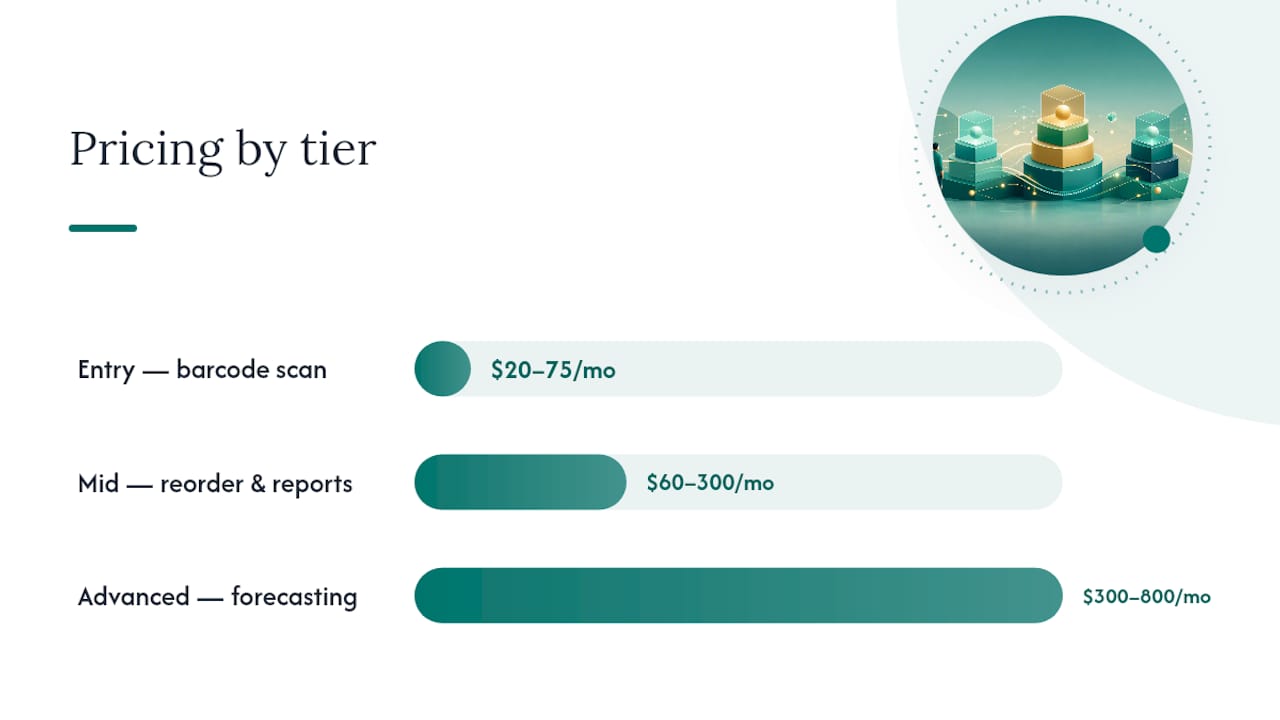
- Entry-level software costs between $20 and $75 monthly, suitable for small operations with basic inventory needs, while mid-range plans ranging from $60 to $300 accommodate growing SMBs with additional features.
- Advanced plans, often above $300 monthly, include demand forecasting and multi-warehouse support, with enterprise solutions exceeding $5,000 monthly and requiring custom quotes.
- The total first-year cost for small teams typically ranges from $7,000 to $8,500, accounting for subscription, onboarding, hardware, and integrations, which surpasses the monthly fee alone.
- Vendors' billing structures, hardware expenses, implementation costs, and overage fees can significantly inflate software costs, so asking detailed questions and calculating annual total cost is crucial.
Table of Contents
- How Much Does Inventory Software Cost? Pricing By Tier
- Per-User Seats, Flat-Rate Tiers, or Perpetual License: How Vendors Bill You
- What Actually Drives Your Inventory System Price
- The Hidden Costs Nobody Puts on the Pricing Page
- Turning Vendor Quotes Into a Real Monthly Budget
- Choosing the Right Plan Without Overpaying or Under-Buying
- Practical Ways to Cut Inventory Software Costs
- Where Bossy Fits the Inventory Budgeting Picture
- The One Number That Actually Matters
- Try Bossy for Operations-Linked Inventory Control
- Sources
- FAQ
How Much Does Inventory Software Cost? Pricing By Tier
Vendors sort themselves into four rough bands, and knowing which one you're shopping in saves you from comparing a corner shop tool to an enterprise platform.
Entry-level plans run about $20 to $75 a month, usually priced per user or for a single location. You get barcode scanning, basic stock counts, and low SKU ceilings. This tier fits a solo retailer or a five-person warehouse team that just needs to stop tracking inventory on a spreadsheet.
Mid-range software costs $60 to $300 a month and starts adding automated reorder points, basic reporting, and support for a handful of sales channels. Most growing SMBs land here. Mid-tier systems built for small teams typically fall in the $100 to $300 monthly range and include the automated reorder alerts that entry tools skip.
Advanced plans, priced from roughly $300 to $800 or more per month, bring demand forecasting, multi-warehouse routing, and deeper e-commerce integrations. This is where full-featured plans commonly land, and where the model often shifts from strict per-seat pricing to a flat-rate tier with generous user caps.
Enterprise systems are quoted, not listed. Custom implementations that include warehouse management modules, RFID tracking, or ERP-level integration frequently exceed $5,000 a month, and on-premise licenses can require a six-figure upfront investment before you factor in maintenance.
What separates these tiers isn't just price, it's what gets unlocked at each level:
- Entry: barcode scanning, single-location tracking, manual reorder alerts
- Mid-range: automated reorder points, multichannel selling, standard reporting
- Advanced: demand forecasting, multi-warehouse transfers, API access
- Enterprise: warehouse management systems (WMS), serial/lot tracking, custom compliance workflows
Per-User Seats, Flat-Rate Tiers, or Perpetual License: How Vendors Bill You
The pricing model matters as much as the sticker price, because two vendors quoting "$150 a month" can mean very different things depending on how they structure the bill.
- Per-user seat pricing. You pay a base fee plus a charge for every employee who logs in. This scales cleanly when you're small, but it punishes growth. A team of four at $15 per seat pays $60. Add six seasonal hires and you're at $150, with no change in what the software actually does for you.
- Flat-rate tiers. You pay a fixed monthly price for a bracket of users, locations, or order volume, whether you use three seats or fifteen. This is usually the better bet for a growing SMB, because it removes the anxiety of every new hire triggering a bigger invoice. The average licensing cost across more than 70 brands works out to roughly $175 per user per month, which is exactly the kind of number a flat tier can protect you from once your headcount grows.
- Perpetual/on-premise licenses. You pay a large sum once, often $30,000 to $100,000, then an annual maintenance fee of roughly 15% to 25% of that license cost to keep receiving updates and support. This model still shows up in manufacturing and distribution, where IT teams prefer owning the infrastructure.
Billing cadence adds another layer. Most cloud vendors offer a discount, typically 10% to 20%, for paying annually instead of monthly. That's a real saving, but it also locks you in for a year with a tool you may not have fully stress-tested yet. Some vendors also set minimum seat counts or monthly order thresholds that push you into a higher bracket the moment you cross a number you didn't know you were watching.
Pro Tip: Ask every vendor for their price at your current headcount and at your headcount six months from now. If the jump between those two numbers is steep, you're looking at per-user pricing dressed up as a "flat rate." A real flat tier barely moves when you add two or three people.
What Actually Drives Your Inventory System Price
Five variables move the number on your invoice more than any marketing page will admit.
Users and seats. Below roughly 6 to 10 active users, per-seat pricing is often cheaper. Cross that line and unlimited-user flat tiers usually win, because you stop paying incrementally for every new hire touching the system.
Locations and warehouses. Adding a second warehouse or storefront frequently triggers a new licensing bracket, not just a configuration change. Multi-site inventory means the software has to track transfers between locations, and that complexity gets priced in.
SKU and order volume caps. Entry and mid-tier plans often cap the number of SKUs or monthly orders you can process before overage charges kick in. A boutique with 200 SKUs pays a very different bill than a distributor pushing 5,000 line items a month through the same software.
Feature modules. Certain capabilities carry a real premium:
- Demand forecasting and AI-driven reorder suggestions
- Serial and lot tracking for regulated or high-value goods
- Manufacturing resource planning (MRP) for assembly and bill-of-materials tracking
- RFID scanning integration
- Returns management and full warehouse management system (WMS) functionality
Integrations and compliance. API access to connect your point-of-sale, accounting software, or e-commerce platform is sometimes included and sometimes billed separately. Growth in AI forecasting and integration capabilities across the market has pushed mid-range plans to include features that used to sit exclusively in enterprise tiers, which is good news for SMBs shopping in that middle band. Security or compliance requirements, like SOC 2 documentation for handling customer payment data, can also add cost if your vendor charges for that tier of support.
The Hidden Costs Nobody Puts on the Pricing Page
The subscription fee is the visible cost. The invisible one is everything it takes to get the software actually running, and that gap is where budgets blow up.
Implementation and data migration range from $500 for a simple, self-serve setup to $40,000 for a complex enterprise rollout with custom data cleaning. Onboarding and third-party implementation for mid-market deployments frequently falls between $799 and several thousand dollars, depending on how messy your existing data is.
Hardware is the other line item people forget to price. Barcode scanners run $200 to $1,500 each, label printers add $150 to $600, and rugged tablets for warehouse floors can run $400 to $900 apiece. A five-person team outfitting two stations might spend $1,500 to $3,000 here alone.
Recurring add-ons like premium integrations, priority phone support, or extra API call volume typically add $0 to $200 or more per month on top of your base subscription.
Here's what that looks like for a realistic five-person retail or small warehouse team in year one:
That range lands close to published buyer-guide examples: a worked first-year budget for a small five-person team frequently falls between $7,000 and $8,500 once subscription, onboarding, hardware, and one integration are all counted. The subscription line is rarely more than a third of what you actually spend in year one.
Turning Vendor Quotes Into a Real Monthly Budget
A vendor quote in isolation tells you almost nothing. Running it through a short checklist and one formula tells you everything.
- Ask what's included at your quoted price. Get a written answer on SKU caps, order volume limits, and how many users are covered before overage fees start.
- Ask about setup fees separately from the subscription. Some vendors bundle onboarding into the quote, others bill it as a distinct project, and the difference can be thousands of dollars.
- Ask about hardware compatibility. Confirm whether your existing scanners or printers will work, or whether you're buying new equipment to match their system.
- Ask for the SLA on support response times, especially if you're running a warehouse where downtime costs you fulfillment speed.
- Ask what happens if you leave. Data export terms and contract exit clauses matter more than they seem to when you're excited about a demo.
Once you have real numbers, run this formula: (annual subscription + amortized one-time costs + recurring add-ons) ÷ 12 = true monthly cost. Amortizing one-time fees over 24 months, rather than dumping them all into month one, gives you a cleaner comparison across vendors quoting different implementation structures.
When comparing per-user offers against flat-rate tiers, project your headcount 12 months out, not just today. A per-seat quote that looks cheap for your current team of four can quietly become your most expensive option the moment you hire three more people for the holiday rush.
Choosing the Right Plan Without Overpaying or Under-Buying
Match the plan to where your business actually is, not where you hope to be in three years.
- A solo operator or micro-business with under 500 SKUs almost never needs advanced-tier forecasting or WMS features. Entry-level software is the right call.
- A growing SMB with multiple locations or a mix of retail and online orders usually needs mid-range or advanced tools with multichannel and transfer support.
- A manufacturer or complex distributor with bill-of-materials tracking or regulatory serial number requirements is shopping in enterprise territory whether the price feels comfortable or not.
Before signing anything, insist on a few contract terms: a clear, written definition of what counts as a "SKU" or an "order" for billing purposes, a data export guarantee so you're never held hostage by your own inventory records, and a trial period long enough to test the software during a real busy week, not a quiet one.
Watch for red flags in the sales process itself. A vendor who won't put SKU caps or overage fees in writing, or who pressures you into annual billing before you've run a single real inventory count, is telling you something about how they'll handle support requests later.
Pro Tip: Run your trial during your busiest week of the month, not your slowest. Software that handles a quiet Tuesday fine can fall apart during a Friday rush with three staff members scanning at once.
Practical Ways to Cut Inventory Software Costs
A few tactical moves lower your bill without limiting your operation.
- Start on a free or low-cost entry plan and add modules in phases as you confirm you actually need them.
- Buy fewer rugged scanners at launch. Staff smartphones with a barcode-scanning app often handle low-volume counts just as well.
- Negotiate seat bundling or a capped surge allowance if your business is seasonal, so a holiday hiring spike doesn't blow up your monthly bill.
- Choose a vendor with bundled integrations for your point-of-sale or accounting software rather than paying separately for a single premium connector. If you're deploying new software without a dedicated IT team, a structured rollout checklist can also shorten the timeline and cut the informal "figuring it out" hours that quietly inflate implementation cost.
Where Bossy Fits the Inventory Budgeting Picture
Inventory software rarely operates in isolation from the rest of your operation, and that's the gap Bossy is built to close. Instead of treating stock counts as a separate system from scheduling or task management, Bossy folds inventory control, stock counts, ordering, and transfers into the same platform your team already uses to run daily operations.
That matters for cost because it removes a category of "hidden" integration expense: you're not paying to connect a standalone inventory tool to your scheduling and task software, because they're the same system.
This type of inventory platform typically includes capabilities such as stock counts, reordering, and transfers tied directly to recurring operational checklists; task verification with photo proof to audit stock counts; audit logs tracking inventory adjustments; and cascading goals that link inventory accuracy to broader team performance metrics.
A free entry tier fits a small team just getting off spreadsheets, while growing multi-location businesses typically move into a paid tier as headcount and location count increase. Retail operations specifically can see how the platform handles frontline retail workflows before committing to a plan.
The One Number That Actually Matters
If you take one thing from this guide, make it this: stop asking vendors "how much is it a month" and start asking "what does this cost me, total, in the first twelve months." The monthly subscription is the smallest, most manipulable number in the entire quote. Vendors know a lower monthly figure closes deals faster, so onboarding fees, hardware requirements, and integration costs get pushed to a follow-up conversation that happens after you've already signed.
The businesses that budget well treat the first-year total cost of ownership as the real price tag, and they build in a pilot period before rolling the software out to the whole team. Get two or three department heads using it for two weeks before you commit company-wide. Negotiate your billing cadence last, once you know the tool works, not first, as a condition of getting a demo.
— Christian
Try Bossy for Operations-Linked Inventory Control
Some modern inventory platforms combine stock counts, transfers, and reordering with scheduling, task verification, and team communication within a single system rather than relying on multiple tools and subscriptions.

That single-platform approach is the practical cost advantage here: less time spent stitching software together, fewer integration fees, and one audit trail instead of three. Compare tiers on the Bossy pricing page or look at the full feature breakdown to see how stock counts and task verification work together, then start a trial to see whether it fits your team's daily rhythm before you commit to anything larger.
Sources
Pricing ranges and the worked first-year example throughout this guide draw from published buyer research, including inFlow's 2026 pricing breakdown, ERP Software Blog's cost driver analysis, Unleashed's per-user cost averages, Medesk's entry-tier pricing data, and Fortune Business Insights' market sizing report. Check current vendor pages directly before finalizing a budget, since pricing shifts as market competition and feature sets evolve.
- How Much Does Inventory Management Software Cost in 2026? A Complete Buyer’s Pricing Guide
- Inventory Management Systems — cost drivers and typical ranges (ERP Software Blog)
- What's the average cost of an inventory management system?
- Inventory Management Software Cost in the US (2026)
- Inventory Management Software Market — Fortune Business Insights
FAQ
Is There a Free Inventory Software Option?
Yes, several vendors offer free entry tiers for very small teams or low SKU counts, though most cap users, locations, or order volume tightly enough that growing businesses outgrow them within months.
What Is the Cheapest Inventory Management Software?
Entry-level cloud plans start around $20 to $50 a month for a single user, though the cheapest sticker price often means the fewest features and the lowest SKU ceiling.
What Is the Most Popular Type of Inventory Software?
Cloud-based, subscription-priced inventory software is the most widely adopted format for SMBs, largely because it avoids the six-figure upfront cost of on-premise systems and scales with monthly billing.
Is Zoho Inventory Completely Free?
Zoho Inventory offers a free plan, but it's limited to a small number of orders and one warehouse. Most growing businesses move to a paid tier once they exceed those caps.
How Much Should I Budget for Inventory Software in Year One?
A realistic first-year budget for a small team, including subscription, onboarding, and hardware, typically falls in the mid to upper thousands range, with published examples clustering around several thousand dollars once a premium integration is added.