Temperature Log Checklist: 9 Fields Plus Ready Templates for Managers
Christian MontenegroSeptember 15, 202613 min read
Every inspector-ready temperature log needs nine fields: date, exact time, unit or item, observed temperature, critical limit, an in-range yes/no mark, a corrective action, staff initials, and manager verification. Check most food service units at least twice daily, AM and PM, with higher frequency for high-volume or HACCP-controlled stations. Grab a printable PDF or a simple digital checklist and you can have this running shortly.
TL;DR:
- Most food safety units should conduct temperature checks at least twice daily, with higher frequency during busy or high-risk periods such as every two to four hours for HACCP-critical points.
- Accurate records must include precise timestamps, explicit unit or batch identification, and decimal temperatures to enable clear timelines and effective audits.
- Corrective actions must be documented with exact details, staff initials, and verification times, as inspectors focus mainly on these entries during audits.
- Digital checklists provide tamper-proof timestamping, alerts, geolocation, and easier review, making them preferable for multi-unit operations managing large or fast-paced fleets.
- Retain temperature records for at least 90 days on-site and up to one or two years for seafood or regulated products, depending on specific federal guidelines.
Table of Contents
- What Goes on a Temperature Log Checklist (Field by Field)
- Free Templates: Printable Sheets, Spreadsheets, and Digital Checklists
- How Often to Check Temperatures and How Long to Keep Records
- Corrective Actions: What Inspectors Actually Read First
- Paper Logs vs. Digital Checklists: Where the Real Risk Hides
- Making Temperature Checks a Habit, Not a Chore
- Where Bossy Fits Into Your Temperature Checks
- Sources
- FAQ
What Goes on a Temperature Log Checklist (Field by Field)
You already know the drill: something feels off with the walk-in, you grab a thermometer, and you write a number on a clipboard. But a number alone doesn't protect you. A health inspector, or your own insurance adjuster after a spoilage claim, wants proof that someone was watching and that someone acted when things went sideways.
That's what a real temperature log checklist does. It turns a single data point into a chain of custody for food safety.
Here's what belongs in every entry, according to the field structure most HACCP templates share:
- Date and exact time. Use the 24-hour clock or write AM/PM with minutes, not just "morning check." Precision matters more than it seems. A job aid used for vaccine storage temperature logs shows exactly why: exact timestamps let you reconstruct a timeline if something goes wrong later.
- Unit or location and item/batch ID. Name the specific fridge, freezer, or hot-hold well, not just "kitchen." If you're logging a delivery, note the batch or lot number.
- Observed temperature with decimals. Write 38.6°F, not "about 39." Rounded numbers create ambiguity when someone reviews the log weeks later.
- Critical limit. State the threshold you're checking against, like 41°F for cold storage or 135°F for hot holding.
- In-range indicator. A simple Y or N column that anyone scanning the sheet can read in two seconds.
- Corrective action, initials, and manager verification. What happened, who fixed it, and who confirmed the fix worked.
A completed fridge row might read: 3/12/2026, 6:15 AM, Walk-in #2, 38.6°F, limit 41°F, Y, N/A, initials JR. A hot-hold well entry during lunch service might show 12:30 PM, Steam well 1, 138°F, limit 135°F, N, N/A, initials MT. A receiving check on a delivery truck could read 9:05 AM, Chicken delivery lot #4521, 39.1°F, limit 41°F, Y, N/A, initials JR, verified DK.
Pro Tip: Skip vague phrases like "checked, looks fine." Inspectors and auditors read corrective-action columns first, and a blank or vague entry raises more questions than a documented problem ever will.
The columns matter less than what they force you to do: look, measure, decide, and sign your name to the decision. That's the actual purpose of a food temperature record sheet, whether it's on paper or a screen.
Free Templates: Printable Sheets, Spreadsheets, and Digital Checklists
You don't need to build a temperature log template from scratch. Three formats cover almost every kitchen situation, and each fits a different stage of your operation.
Single-page printable logs work best for one unit. Post a dedicated sheet on the walk-in door or the reach-in cooler next to the prep line. Staff check the box, write the number, move on. These sheets are cheap to print in bulk and easy to swap monthly, which matters if your health department wants to see a full month of history during a visit.
Daily multi-row sheets cover several units at once. If you're running four coolers, two freezers, and a hot-hold line, a single clipboard sheet with rows for each unit and columns for AM/PM checks saves you from hunting down five different papers. Clip a fresh sheet to the board each morning and rotate the completed ones into a binder by week.
Spreadsheet templates shine when you need to share data across locations. A cloud spreadsheet lets a multi-unit operator or franchise group see every location's log from one dashboard. Build in a simple conditional formatting rule, so any cell above or below your critical limit turns red automatically. That one formula does the work of a second set of eyes.
Digital checklists replace paper entirely once you're ready. The flow looks like this: a recurring task fires at your set check times, a staff member logs the temperature, the system timestamps it automatically, and if the number falls outside your limit, a corrective-action prompt pops up before they can close the task. A manager then reviews and signs off electronically, and the whole thing lives in a searchable, exportable log.
Here's when to make the switch:
- You're managing more than two or three units and paper sheets keep going missing.
- You've had an inspector question a gap in your paper trail.
- You want alerts sent to a manager's phone the moment a fridge drifts out of range, rather than finding out at the next scheduled check.
None of these formats is wrong. A single-unit food truck probably doesn't need a cloud spreadsheet. A five-location group probably shouldn't rely on clipboards. Match the tool to the number of units you're tracking and how fast you need to know when something's wrong.
How Often to Check Temperatures and How Long to Keep Records
Twice daily is the floor, not the target. Most health departments expect a morning and evening check at minimum, but that baseline shifts fast once volume or risk goes up.
Operations with HACCP plans, high-volume service, or critical control points typically check every two to four hours during operating hours, according to guidance from Food Standards Australia New Zealand. If you're running a buffet line, a hot-hold station during a rush, or handling raw poultry through multiple prep stages, twice a day won't cut it. Build the higher frequency into your HACCP plan directly, tied to the specific control point that carries the risk.
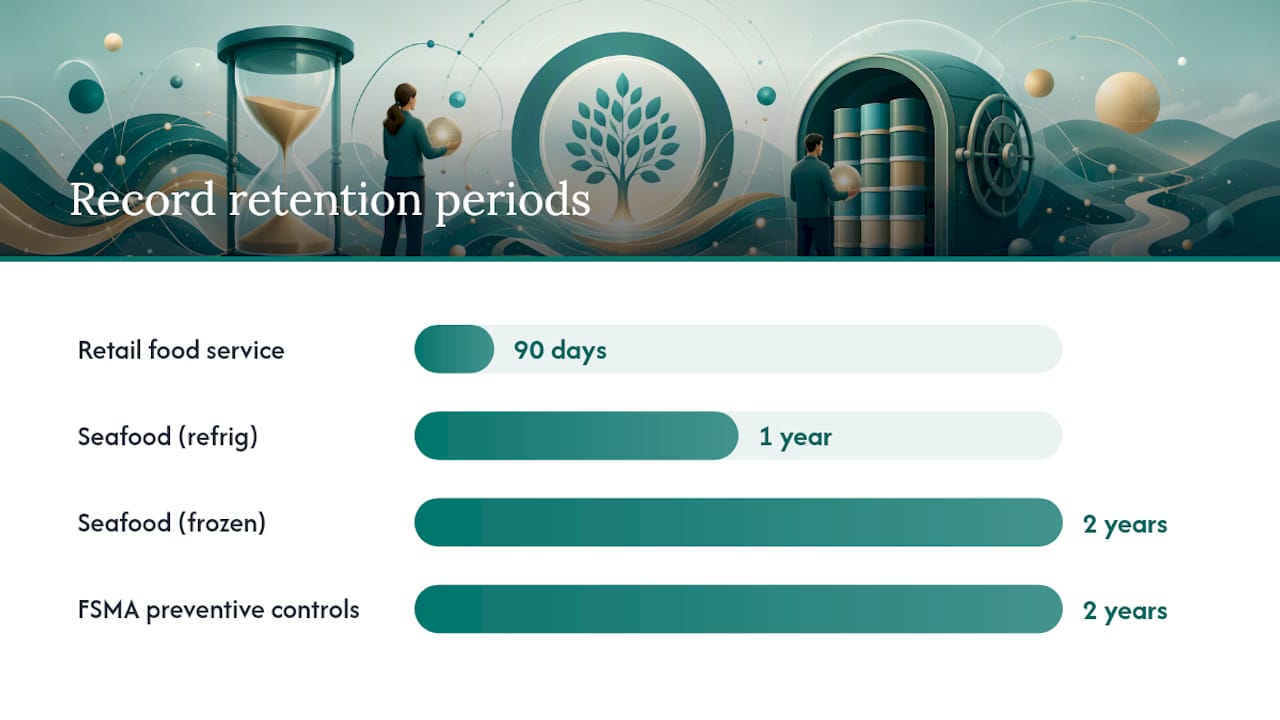
Retention is where a lot of managers guess wrong. Federal rules create real variation depending on what you're storing:
| Record type | Typical retention | Governing standard |
|---|---|---|
| General retail food service | 90 days on-site, archived 1 year | Industry practice |
| Seafood HACCP (refrigerated) | 1 year | Federal HACCP rule |
| Seafood HACCP (frozen) | 2 years | Federal HACCP rule |
| FSMA preventive-controls records | 2 years | 21 CFR Part 117 |
A practical default for most retail kitchens is 90 days on-site with a full year archived, based on record-keeping guidance from the University of Florida IFAS extension. If you handle seafood or fall under FSMA preventive controls, your retention window stretches to one or two years depending on the product category, so check which federal rule actually governs your specific operation before you shred anything.
Corrective Actions: What Inspectors Actually Read First
An inspector doesn't linger on the temperature column. They go straight to the corrective-action entry, because that's where you prove your system catches problems before they become health risks.
The FDA's preventive-controls rule treats corrective-action documentation as central to compliance, not an optional afterthought. A precise, time-stamped action followed by a re-check often resolves what would otherwise turn into a critical violation on your inspection report.
A compliant corrective-action entry needs four things: the immediate action taken, the time it happened, staff initials, and a manager follow-up with a re-check time and result. Here are three examples you can copy and adapt:
- Thermostat drift. "Adjusted thermostat from 44°F to 38°F setting at 2:15 PM. Rechecked at 2:45 PM, reading 39.2°F, within limit. Initials: JR. Verified: DK, 2:50 PM."
- Unit failure. "Walk-in #2 reading 46°F at 6:00 AM. Product moved to backup fridge #4 at 6:10 AM. Maintenance called at 6:15 AM. Rechecked backup unit at 7:10 AM, reading 38°F, within limit. Initials: MT. Verified: JR, 7:15 AM."
- Product loss. "Hot-hold well reading 128°F at 12:00 PM, below 135°F limit for over 30 minutes. Discarded 6 lbs chicken, 4 lbs rice per waste log #112. Well reset and rechecked at 12:45 PM, reading 140°F. Initials: MT. Verified: DK, 12:50 PM."
Pro Tip: Train every shift lead on these three phrasing patterns before they ever need them. A manager scrambling to write a corrective action during a real excursion tends to skip details that matter later, like exact discard weights or the maintenance call time.
Document the full chronology during any excursion: time of discovery, unit and room temperature, affected products by lot when possible, the action taken, who was contacted, and the time items were restored or discarded, following the model used in vaccine storage job aids. That level of detail turns a bad afternoon into a documented, defensible response.
Paper Logs vs. Digital Checklists: Where the Real Risk Hides
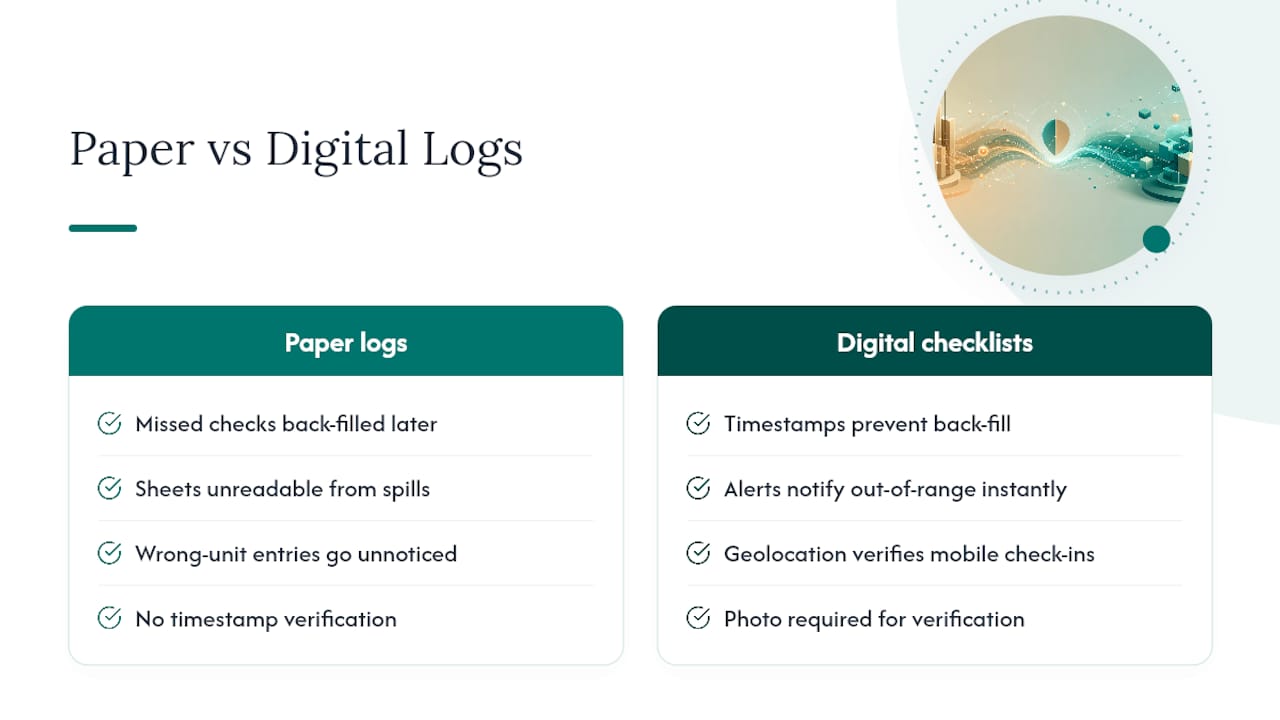
Paper logs fail in predictable ways. Someone forgets a check during a rush and fills in a plausible-looking number an hour later. A sheet gets left in a puddle near the dish pit and becomes unreadable. A new hire checks the wrong unit and nobody catches it until the weekly review.
Digital checklists close most of those gaps by design. A timestamp locks the moment of entry, so back-filling isn't possible the way it is on paper. Alerts notify a manager the moment a reading falls out of range, instead of waiting for the next scheduled review. Geolocation on mobile check-ins confirms the entry actually happened at the unit, not from a break room three rooms away.
If you're mid-transition, run both systems for a stretch. Keep digital as your primary record and export printable PDFs for inspectors who still want paper in hand. Hold a laminated paper backup near each unit in case of a connectivity issue during a shift.
This is where a platform like Bossy's restaurant tools fits the job without turning you into a full-time auditor. Recurring checklists fire automatically at your set check times. Task verification requires a photo, timestamp, and location before a check counts as complete. A manager approval queue means nothing gets marked "done" until someone with authority actually reviews it, and every entry lands in a searchable audit log you can pull up the moment an inspector asks for a month of history.
Digital monitoring reduces gaps and creates a tamper-resistant history that paper logs simply cannot match, which is exactly what regulators look for when they review a facility's compliance record.
Verification, done right, isn't about watching over someone's shoulder. It's about knowing the check happened, the number got recorded honestly, and someone with authority signed off. That's a different thing than micromanaging your staff, and your team will feel the difference.
Making Temperature Checks a Habit, Not a Chore
Assign ownership by shift, not by person, and rotate who's responsible each week. A single employee checking the same fridge every day for months develops blind spots. They stop really looking at the number and start writing what they expect to see.
Managers should build in a weekly verification routine: sign off on the week's entries, spot check two or three random timestamps against actual staff schedules, and scan for suspiciously identical readings across different days. That pattern, more than any single missed check, is what tips off an inspector or a manager that logs are being filled in from memory rather than a thermometer.
Train staff on the corrective-action phrasing early, and recognize the people who document a real problem honestly rather than punishing them for finding one. A team that hides a temperature excursion because they're afraid of the paperwork is a much bigger risk than one that flags it right away.
— Christian
Where Bossy Fits Into Your Temperature Checks
Bossy replaces the clipboard-and-hope approach with recurring checklists that actually verify the work happened, not just that a box got checked. Every temperature check comes with photo and timestamp proof, routes into a manager approval queue, and lands in an exportable audit log you can hand an inspector without digging through a binder.

A simple way to test it: pilot one kitchen with recurring opening and closing temperature checks, plus a weekly manager verification workflow, before rolling it out to every unit. You'll see gaps close within the first week, because the system won't let a check get marked complete without proof. If you're running a multi-location group, the features page breaks down how recurring tasks, approvals, and audit trails work together, and the restaurant-specific tools page shows how other frontline teams have set up their checks. Head to Bossy to start a trial and build your first temperature checklist today.
Sources
- University of Florida IFAS extension — FS436 (record-keeping guidance)
- Texas DSHS — Vaccine storage temperature log (job aid)
FAQ
Can You Provide an Example of a Temperature Log?
A basic entry includes date, time, unit name, observed temperature, critical limit, an in-range Y/N mark, corrective action if needed, and staff initials, such as 3/12/2026, 6:15 AM, Walk-in #2, 38.6°F, limit 41°F, Y, N/A, JR.
How Often Are Temperatures Required to Be Logged?
Most health departments expect checks at least twice daily, AM and PM, while high-volume or HACCP-controlled stations typically log every two to four hours during operating hours.
What Is a Good Temperature Log Book for a Restaurant?
The best format matches your unit count: a single-page printable sheet for one fridge, a multi-row daily sheet for several units, or a digital checklist tool like Bossy once you need timestamped proof and manager sign-off across multiple locations.
Where Can I Find Temperature Log Sheets?
Printable PDF sheets and spreadsheet templates are widely available through food safety resources like LoopString's HACCP template, or you can build a recurring digital version directly inside an operations platform.
How Long Should I Keep Temperature Records?
A practical default is 90 days on-site with a full year archived, though seafood HACCP and FSMA preventive-controls records require one to two years depending on the product category.