Copyable Employee Polls Managers Can Run in Team Chat
Christian MontenegroSeptember 5, 202620 min read
The fastest way to lift engagement is to run short, specific polls instead of one long survey once a year. Start with a one-question weekly pulse ("How was your week? 1 to 5") and a 30-second icebreaker before your next meeting. Below you'll find categorized questions, cadence rules, and templates you can copy today.
TL;DR:
- Weekly one-question pulses, with a response rate of 60 to 80%, enable quick trend analysis and timely issue-addressing.
- Match poll types to specific moments, such as icebreakers before meetings or remote check-ins on Mondays, to maximize relevance and engagement.
- Use transparency and visible follow-up on poll results to foster trust and motivate ongoing participation, strengthening the polling system’s effectiveness.
- Avoid survey fatigue by varying formats, alternating light and heavy topics, and sharing actionable results promptly.
- Conduct anonymous and sensitive-topic polls carefully, ensuring they inform tangible actions to maintain honesty and trust within teams.
Table of Contents
- Which Poll Type Fits Which Moment?
- Fun and Icebreaker Poll Questions That Actually Get Answers
- Engagement and Pulse Poll Questions Worth Repeating
- Meeting, Event, and Remote-Work Poll Ideas
- Recognition and Team-Building Poll Prompts
- How to Run Employee Polls That Actually Produce Action
- Sample Poll Templates and a Pre-Send Checklist
- Using Employee Polls for Decision-Making and Strategy
- Types of Employee Polls Beyond Engagement
- Best Platforms and Tools for Conducting Employee Polls
- Legal and Ethical Considerations in Employee Polling
- How to Increase Participation and Reduce Survey Fatigue
- Analyzing and Interpreting Poll Data Effectively
- Why Polls Matter More on Frontline Teams Than Anywhere Else
- Run Polls Where Your Team Already Works
- Sources
- FAQ
Which Poll Type Fits Which Moment?
You don't need one perfect poll. You need the right poll for the moment you're in. Here's a quick reference for matching format to occasion, so you're not writing engagement poll topics from scratch every week.
- Icebreaker: Multiple-choice, 1 question. Example: "Coffee or tea?" Use before meetings.
- Weekly pulse: Single-item Likert scale. Example: "How would you rate this week, 1 to 5?" Use every Friday.
- Meeting feedback: 2 to 3 quick selects plus one open comment. Example: "Did this meeting hit its goal?" Use right after the call ends.
- Remote check-in: Yes/no or emoji slider. Example: "Do you have what you need to work today?" Use Monday mornings.
- Recognition: Open nomination or multiple-choice. Example: "Who went above and beyond this week?" Use biweekly.
- Event poll: Ranking or word cloud. Example: "Rank these team lunch spots." Use live, during the event.
- Logistics: Yes/no or multiple-choice. Example: "Which shift start time works better for you?" Use whenever scheduling changes.
Keep each one to a single screen. If a poll needs scrolling, it's not a poll anymore. It's a survey wearing a disguise.
Fun and Icebreaker Poll Questions That Actually Get Answers
These are staff opinion polls at their lightest, built to warm people up before you ask anything that matters. Keep them open rather than anonymous. The whole point of an icebreaker is connection, and nobody bonds over an anonymous answer nobody can react to. Themed, categorized poll questions boost participation in meetings and events, and social-proof research on group behavior backs the logic: light, low-stakes questions warm people up before you ask anything that requires real thought or vulnerability, an effect documented in classic social influence research.
Multiple-choice icebreakers work because there's no wrong answer and no typing required.
- Coffee or tea?
- Cats or dogs?
- Morning person or night owl?
- Beach vacation or mountain cabin?
- Sweet or salty snacks?
- Window seat or aisle seat?
- Texting or calling?
- Pizza toppings: pepperoni, veggie, or plain cheese?
- Favorite season: summer, fall, winter, or spring?
- Preferred lunch: eat at your desk or step away?
- Movie night pick: comedy, action, or documentary?
- Weekend plans: staying in or going out?
This-or-that rapid prompts move fast and work great as a five-minute warm-up before a stand-up.
- Early bird or last-minute planner?
- Group chat or one-on-one texts?
- Karaoke or trivia night?
- Road trip or flight?
- Netflix binge or a good book?
- Working from home or working from a coffee shop?
- Team lunch or team happy hour?
- Handwritten notes or digital reminders?
- Sunrise or sunset?
- Spontaneous plans or a set schedule?
Would-you-rather prompts push a little further into hypotheticals, which makes them great for building genuine laughs into a Monday meeting.
- Would you rather have unlimited PTO or a permanent four-day workweek?
- Would you rather work from a beach with spotty Wi-Fi or a mountain cabin with none at all?
- Would you rather give up your phone for a week or your coffee?
- Would you rather always be 10 minutes early or always be told meetings start 10 minutes late?
- Would you rather have a talking pet or a self-cleaning desk?
- Would you rather skip small talk forever or be forced to make it with everyone you meet?
- Would you rather have a four-hour commute with great music or a 10-minute commute in silence?
- Would you rather relive your best workday every day or never repeat a single one?
- Would you rather be famous for something embarrassing or completely unknown but respected?
- Would you rather have the ability to pause time or rewind it 10 minutes?
Rotate these so the same three don't show up every week. A stale icebreaker gets ignored faster than no icebreaker at all.
Engagement and Pulse Poll Questions Worth Repeating
Pulse polls are where staff survey questions earn their keep. A single-item weekly question, tracked consistently, gives you a comparable trend line without asking anyone to fill out a form. Weekly pulse questions run consistently provide a fast, comparable read on engagement over time, and that consistency matters more than the clever wording of any one question.
Weekly (single item, track the trend):
- "On a scale of 1 to 5, how was your week?"
- "How energized do you feel about your work today?" (emoji slider: 😞 😐 🙂 😄)
Monthly (broader diagnostic, still short):
- "How satisfied are you with your current workload?"
- "How clear are you on what's expected of you this month?"
- "How supported do you feel by your manager right now?"
- "How likely are you to recommend this team as a great place to work?" (eNPS-style, 0 to 10)
Five-point Likert scales are recommended for pulse questions because they're fast to answer and easy to chart month over month. An emoji slider works just as well for teams that skim text on mobile between shifts.
Response rate to watch: Short weekly pulses often land in the 60 to 80% response range, while full organization-wide surveys aim for 70% or higher. If your weekly number drops below that, treat it as a warning sign before you treat it as a data point.
When a score drops two weeks running, don't wait for the monthly pulse to investigate. Pull the manager of that team into a short conversation the same week. A dip that goes unaddressed for a month usually turns into a resignation letter, not a data trend.
Meeting, Event, and Remote-Work Poll Ideas
Meetings and remote days each come with their own blind spots, and a well-timed poll closes them faster than a status update ever could.
Pre-meeting expectation polls set the tone before anyone talks.
- "What's the one thing you want out of today's meeting?"
- "Rate your energy level right now" (helps you gauge whether to open with something light)
Post-meeting feedback takes 20 seconds and tells you whether the meeting was worth the calendar slot.
- "Did this meeting achieve its stated goal?" (yes/no)
- "Was the meeting length right, too short, or too long?"
- "One thing we should do differently next time?" (open text, optional)
Live polls during meetings or events keep people paying attention instead of checking email.
- Word clouds: "In one word, describe this quarter."
- Ranking: "Rank these three project ideas by priority."
- Quick select: "Which of these three dates works for the team offsite?"
Live polling formats like word clouds and ranking questions are especially effective for keeping attention during meetings and events, since they require an answer in real time rather than a delayed response after the meeting ends.
Remote-work check-ins catch the problems that don't show up on a video call.
- "Do you have what you need to work effectively today?" (yes/no)
- "How reliable was your tech setup this week?" (Likert)
- "Which meeting schedule works best for your time zone?" (multiple-choice)
Recognition and Team-Building Poll Prompts
Recognition polls do double duty. They surface who deserves a shout-out, and they double as light team-building without adding a separate activity to the calendar.
- Peer nomination poll: "Who on the team went above and beyond this week?" (open text, name a colleague)
- Recognition preference poll: "How do you prefer to be recognized: public shout-out, private thank-you, or a small reward?"
- Two-truths-and-a-lie prompt: Post three statements about a team member and let people guess which one is false.
- Favorite team memory poll: "What's your favorite memory from this team so far?" (multiple-choice list of past events, plus "other")
- Gratitude round: "Name one thing a coworker did this month that made your job easier."
The nomination poll only works if the answers go somewhere. Pull the top mentions into your next team huddle or company announcement, and say the person's name out loud. A nomination that disappears into a spreadsheet teaches people to stop nominating.
How to Run Employee Polls That Actually Produce Action
Cadence is the difference between a poll people answer and one they scroll past. Run a one-question pulse every week, a slightly longer pulse (4 to 6 questions) once a month, and a deeper, multi-topic survey once a quarter. Weekly stays short on purpose: the moment a "quick poll" takes three minutes, response rates drop.
Anonymity is a trade-off, not a default setting. Use anonymous polls for sensitive topics like manager feedback or workload concerns, where honesty matters more than connection. Keep icebreakers, recognition polls, and team-building prompts open, since the value there comes from seeing who answered what.
Good poll questions follow a few rules:
- Ask one idea per question. "How happy are you with pay and benefits?" is two questions wearing a trench coat.
- Balance your answer options. Don't stack three positive choices against one negative one.
- Include "prefer not to say" on anything personal or sensitive.
- Keep the wording plain. If you need a follow-up sentence to explain the question, rewrite the question.
The real work starts after the poll closes. Send the poll, collect responses, prioritize what came up most, act on at least one item, then report back to the team on what changed. Failing to close that loop is one of the more common HR mistakes that quietly kills engagement, because employees stop answering polls the moment they suspect nothing happens with their answers. Assigning a clear owner and timeline to each action item is what separates a team that trusts the process from one that's just going through the motions. Bossy's guide on verifying that work actually got done covers the same principle from the operations side: visible follow-through is what makes people believe the system is real.
Pro Tip: Announce the poll result and the action you're taking in the same message. "You said X, we're doing Y starting Monday" takes ten seconds to write and does more for participation than any incentive program.
Sample Poll Templates and a Pre-Send Checklist
Copy these directly. Swap the wording to match your team's voice, but keep the structure.
- Weekly pulse (Likert): "How would you rate this week overall?" 1 (rough) to 5 (great). One question, no exceptions.
- Post-meeting feedback: Three quick selects (Did this meeting hit its goal? Was the length right? Was the agenda clear?) plus one open field: "Anything we should change next time?"
- Fun icebreaker (this-or-that): "Quick one before we start: coffee or tea?" Drop it into chat two minutes before the meeting starts.
Before you hit send on any poll, run through this:
- Who's the audience (whole company, one team, one shift)?
- Anonymous or open?
- How many questions (aim for one to three)?
- Who owns reading and acting on the results?
- What's the response window (24 hours works for most)?
- What's the follow-up plan once results come in?
Using Employee Polls for Decision-Making and Strategy
Polls stop being a morale gimmick the moment you use them to decide something real. If you're choosing between two vendors for the break room snack program, that's a poll question, not a guess. If you're deciding whether to shift a shift start time by 30 minutes, ask the people whose mornings it affects before you announce the change.
The strongest use case is testing a decision before you commit to it. Instead of announcing a new scheduling policy and hoping it lands, poll a sample question first: "Would a rotating weekend schedule work better for you than the current fixed one?" You get a directional read before you spend a month building something people don't want.
Strategy development benefits the same way. Quarterly deep surveys are a good moment to ask forward-looking questions: "What's the one change that would most improve how you work here?" or "Which of these three initiatives should we prioritize next quarter?" Rank the responses, share the top three back to the team, and explain which one you're acting on and why. That single step, closing the loop between a strategic question and a visible decision, is what turns a poll from a checkbox exercise into a real input on how the business runs.
Types of Employee Polls Beyond Engagement
Engagement pulses get most of the attention, but some of the most useful staff opinion polls have nothing to do with morale.
Benefits feedback polls ask which perks people actually use versus which ones sound good on paper. "Which benefit would you use more if we improved it: health coverage, PTO flexibility, or professional development budget?" tells you where to spend the next budget cycle instead of guessing.
Training needs polls surface skill gaps before they become performance problems. "Which of these three skills would help you most in your current role?" gives you a prioritized list instead of a generic training calendar nobody asked for.
Diversity and inclusion polls need extra care with anonymity, since these topics carry more risk of people holding back honest answers if they fear being identified. Questions like "Do you feel your perspective is heard in team decisions?" or "Do you feel comfortable raising concerns to your manager?" work best as anonymous, multi-question pulses run quarterly rather than weekly, with results shared in aggregate only.
Logistics and operations polls round out the list: shift preferences, equipment needs, facility feedback. These tend to get the highest response rates of all, because the payoff for answering is immediate and visible.
Best Platforms and Tools for Conducting Employee Polls
The right tool depends on where your team already spends their day. If your staff works from a shared inbox, a standalone survey tool works fine. If they're on the floor, in a kitchen, or moving between job sites, a poll buried in an email nobody opens is worse than no poll at all.
For distributed and frontline teams, the poll needs to live inside the same app people already use for scheduling, chat, or task lists. Some operations platforms build polls directly into team chat, so a manager can send a one-question pulse in the same place they post shift changes or checklist updates, without needing a separate login.

For general-purpose survey building, dedicated survey and polling tools offer more advanced formats such as ranking, word clouds, and live event polling. For remote or hybrid teams whose work happens mostly through project software, a lightweight poll add-on inside existing project channels can work well too. Smaller operations and independent consultants often get by with even simpler tools, an approach covered in more detail by ctrl + alt + orion for teams that want low-effort options without a full platform commitment.
Whatever you pick, the deciding factor isn't feature count. It's whether your team will actually see the poll on the day you send it.
Legal and Ethical Considerations in Employee Polling
A poll is a small thing until someone feels pressured to answer it a certain way. That's the line managers need to watch.
Never make participation feel mandatory in a way that ties to performance reviews. If people suspect their manager can see who answered what on a sensitive question, you've lost the honesty you were polling for in the first place. Keep anonymous polls genuinely anonymous, meaning don't cross-reference small-team results against headcount in a way that makes someone identifiable by process of elimination.
Be transparent about what happens to the data. If you're aggregating results for a company-wide report, say so before you send the poll, not after. If a question touches protected categories (age, disability, family status, and similar topics), keep it optional and anonymous, and consult your organization's HR and legal guidance before adding it to any regular pulse.
Don't ask a question you're not prepared to act on. Polling people about pay satisfaction and then doing nothing for a year erodes trust faster than never asking at all. If a topic is too sensitive or too complicated to act on right now, it's better to leave it out of the poll than to ask and go silent.
How to Increase Participation and Reduce Survey Fatigue
Survey fatigue happens when polls feel repetitive, pointless, or too frequent. The fix isn't fewer polls. It's smarter sequencing.
- Alternate light and heavy topics. A team that just answered a workload-stress pulse doesn't need another serious question the following week. Escalating too fast into heavy topics reduces long-term participation; mixing in a fun icebreaker between pulses keeps trust intact.
- Keep weekly pulses to one question, always. The moment "quick" stops being quick, people stop answering.
- Vary the format. Likert one week, emoji slider the next, multiple-choice the week after. Repetition breeds autopilot answers.
- Show the results. Even a simple "Here's what the team said" message after a poll closes reminds people their answer went somewhere.
- Pick a consistent day and time. A pulse that arrives Friday afternoon every week becomes a habit; one that arrives randomly gets forgotten.
The single biggest lever is visible follow-through. Sharing the action taken after a poll, complete with an owner and a timeline, is the strongest known driver of repeat participation. People don't get tired of answering polls. They get tired of answering polls that go nowhere.
Analyzing and Interpreting Poll Data Effectively
A single data point tells you almost nothing. A trend line tells you everything. Track your weekly pulse score over eight to twelve weeks before drawing conclusions from any single dip, since one bad Friday afternoon can skew a single week's number without meaning anything long-term.
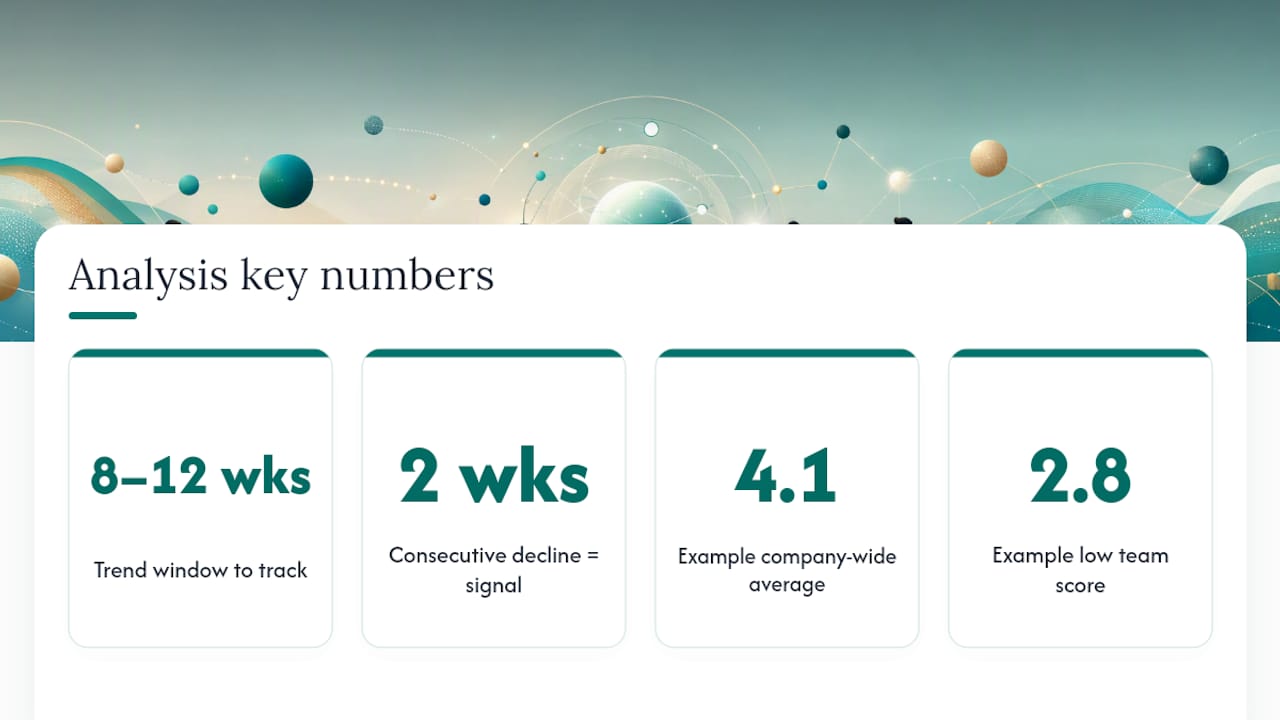
Segment where you can, without breaking anonymity. If you can compare scores by team or shift without identifying individuals, you'll often find the company-wide average is hiding a real problem in one location. A 4.1 average company-wide can mask a 2.8 in one struggling team.
Watch for two-week patterns specifically. A single low score is noise. Two weeks running in the same direction is a signal worth a direct conversation with that team's manager before the monthly pulse even comes around.
For open-text responses, look for repeated phrases rather than trying to read every comment individually. If five people independently mention scheduling as a stressor, that's your monthly pulse topic, not a coincidence. Different formats serve different analysis needs: Likert data is built for trend charts, multiple-choice data is built for quick preference counts, and open text is built for spotting themes, not for statistical precision.
Why Polls Matter More on Frontline Teams Than Anywhere Else
Frontline teams don't check a company intranet between shifts. If a poll doesn't show up where the work already happens, chat, a shift board, a quick huddle, it doesn't happen at all. That's why Bossy builds polls into the same team chat where managers already post schedules and task updates, rather than treating engagement as a separate system to log into.
The bigger idea is rhythm. A poll that runs once, out of nowhere, feels like an audit. A poll that runs every week, tied to the same task verification and goal tracking a manager already uses, feels like part of how the team operates. That's the difference between engagement as an event and engagement as a habit. Bossy's guide to building managers people actually trust covers the same principle: consistency, not grand gestures, is what earns a team's honesty.
— Christian
Run Polls Where Your Team Already Works
Most engagement tools live in a separate app your frontline team has to remember to open. Some platforms integrate polls, announcements, and quick check-ins directly inside team chat used for shift updates and task lists, so a one-question weekly pulse gets seen the same day it is sent.

Beyond the poll itself, certain platforms connect the answer to what happens next. For example, if a pulse score dips because of workload, they let you assign follow-up tasks, verify completion, and track progress against cascading goals, all without switching tools. The features page covers how task verification and analytics dashboards work together with team polls, and the Bossy homepage is the place to start if you're ready to see it running against your own team's schedule this week.
Sources
- Employee Engagement Pulse Questions | 30+ Must Ask
- The 45 Questions Your Employee Engagement Survey Needs | Workday
- Fun and Creative Poll Questions for Meetings, Events & Teams
FAQ
What are some good poll ideas for a team meeting?
A one-question icebreaker before the meeting ("Coffee or tea?") and a one-question pulse after it ("Did this meeting hit its goal, yes or no?") cover both energy and feedback without adding time to the agenda.
What are some funny poll questions to ask coworkers?
Would-you-rather prompts tend to land best, like "Would you rather give up coffee for a week or your phone?" or "Would you rather always be 10 minutes early or always told meetings start 10 minutes late?"
What are 5 good survey questions to ask employees?
Try these five: "How was your week, 1 to 5?", "How clear are you on what's expected of you?", "How supported do you feel by your manager?", "How satisfied are you with your workload?", and "What's one thing we should change this month?"
What is an example of a good employee poll?
A weekly single-item Likert pulse, "Rate your week from 1 to 5," is a strong example because it's fast to answer, easy to track over time, and gives managers a comparable trend rather than a one-off snapshot.
How often should managers run employee polls?
Run a one-question pulse weekly, a slightly longer pulse monthly, and a deeper multi-topic survey quarterly, keeping every format as short as the goal allows.