Procurement Teams: 8 Steps for a Purchase Order Workflow That Holds
Christian MontenegroAugust 29, 202612 min read
A purchase order workflow is the standardized process that turns a request into a paid, matched invoice. The fastest path to control: sort spend into categories, apply approval rules by threshold and category, automate the handoffs between requester and supplier, and enforce three-way matching before anything gets paid. Procurement or finance should own it, with clear roles for requesters and approvers.
TL;DR:
- Building approval thresholds by category and amount, with fallback approvers and standardized templates, prevents delays and mismatches during the approval process.
- Automating three-way matching and supplier portal integration significantly reduces invoice discrepancies and manual re-entry errors.
- Monitoring key KPIs such as cycle time, match rate, and exception rate with role-specific dashboards ensures workflow efficiency and highlights systemic issues.
- Deploying new workflows gradually, with mapping, piloting, and training, minimizes disruptions and allows iterative improvements based on real-time data.
- Incorporating verification tasks, like photo proof of goods, closes the gap between approval controls and actual receipt validation, improving audit readiness.
Table of Contents
- What Is a Purchase Order Workflow, Step by Step?
- Why Do Purchase Order Workflows Break Down?
- How Should You Design Approval Thresholds and Categories?
- What Automation Actually Moves the Needle?
- Which KPIs Actually Show Whether Your Workflow Works?
- How Do You Roll Out a New PO Workflow?
- Why Task-Level Verification Closes the Gap Approval Matrices Can't
- Where Bossy Fits Into Your Purchase Order Workflow
- Sources
What Is a Purchase Order Workflow, Step by Step?
A purchase order workflow typically moves through eight stages: requisition, PO creation, approval, supplier notification, fulfillment, receipt, invoice matching, and payment. That's the standard purchase order process flow most procurement teams follow, whether they run it on paper, in a spreadsheet, or inside an ERP. Here's how each stage actually works, and what tends to trip people up at each one.
-
Requisition. Someone identifies a need and submits a request. A solid requisition form captures the cost center, a short justification, the preferred supplier if there is one, and the date the item or service is needed by. Skip the justification field and you'll spend weeks chasing down "why did we buy this" during audits.
-
Routing and approval. The requisition hits a routing rule based on category, amount, or department. Assign a named approver for each category, not just a title. If your only approver for equipment purchases is out for two weeks, that's a bottleneck waiting to happen. Every approval chain needs a fallback approver who can step in without breaking the chain of accountability.
-
PO creation. Once approved, the requisition converts into a purchase order with required fields: PO number, supplier details, line-item descriptions, quantities, unit prices, delivery date, and payment terms. Use templates by category (services, goods, recurring) so the fields never vary by who's filling them out.
-
Sending and supplier acknowledgment. The PO goes out by email, EDI, or a supplier portal depending on order volume and how the vendor operates. Higher-volume vendors are worth the setup cost of an EDI connection or a portal; low-volume vendors are fine on email with a confirmation reply requested.
-
Fulfillment and shipment tracking. The supplier ships, and someone on your side should be tracking expected delivery against the date on the PO. This is the stage most companies leave completely unmonitored until the order is already late.
-
Goods receipt and inspection. Whoever receives the shipment logs it against the PO, checking quantity and condition. This receipt record becomes the second leg of your matching process, so skipping it here creates problems three steps later.
-
Invoice matching. Two-way matching checks the invoice against the PO. Three-way matching adds the receipt record, confirming that what was ordered, what arrived, and what's being billed all agree. Three-way matching catches the errors two-way matching misses, like a supplier billing for quantities that never showed up.
-
Payment and audit trail. Once matched, the invoice clears for payment, and the full record, from requisition to payment, gets archived. That trail is what makes an audit painless instead of a scramble through email threads.
Each handoff between these stages is where things usually break. Build the workflow around minimizing those handoffs, not maximizing the number of checkpoints.
Why Do Purchase Order Workflows Break Down?
Most PO failures trace back to a handful of root causes, and they tend to repeat across companies of every size.
- Approval bottlenecks. A single approver for an entire category creates a single point of failure. When that person is on vacation or swamped, requests stall for days.
- Maverick and retroactive purchasing. When policy is vague about what needs a PO before the purchase happens, people buy first and file paperwork later. That defeats the entire purpose of the workflow.
- PO-to-invoice mismatches. These almost always trace back to missing PO numbers on invoices or receipts that never got logged. No receipt record means no way to run three-way matching.
- Lack of visibility. When requisitions live in one system, POs in another, and invoices in a third, nobody can answer "where is this order right now" without emailing three people.
- Manual re-entry errors. Typing the same line items into a requisition, then a PO, then an invoice record triples the chance of a typo that causes a mismatch later.
Pro Tip: If a significant share of your invoices are landing as exceptions, don't add more approval steps. Trace five recent exceptions back to their root cause first. You'll usually find one or two systemic gaps, like missing receipt logging, causing most of the pain.
How Should You Design Approval Thresholds and Categories?
Design decisions made once, at the start, save months of firefighting later. Here's what actually needs deciding before you write a single approval rule.
- Segment spend into categories. Office supplies, equipment, professional services, and recurring subscriptions all carry different risk profiles and should have different rules, not one blanket policy.
- Build approval matrices by amount, role, and category. A $500 supply order and a $50,000 equipment purchase should never route through the same single-approver chain. Assign fallback approvers for every tier so nothing stalls waiting on one person.
- Set PO-required thresholds. Decide the dollar amount below which a purchase can skip full PO creation, and document exactly what counts as an exception and who can approve one.
- Standardize templates and required fields. Standardized PO templates with consistent fields across every category are what prevent the downstream mismatches that plague invoice matching later.
- Plan the rollout and training. A new approval matrix means nothing if approvers don't know their thresholds or requesters don't know which category their purchase falls under. Budget real time for this, not a five-minute email announcement.
What Automation Actually Moves the Needle?
Automation only pays off when it targets a real bottleneck, not when it just digitizes a broken manual process. The advice from process automation specialists is blunt: identify where the actual delay happens before automating anything, or you'll just build a faster version of the same problem.
- Use conditional "if-then" logic. Set rules that bypass approval steps entirely for trusted vendors below a set threshold. If a recurring $200 order from an approved supplier doesn't need a human's eyes, don't route it through one.
- Integrate with your ERP or accounting system. PO management platforms that connect to ERPs can auto-generate purchase orders from approved requisitions and keep records synced, cutting out manual re-entry at the source.
- Automate three-way matching. This is where automation shows up fastest in your metrics, since software can flag mismatches between PO, receipt, and invoice in seconds instead of a clerk cross-referencing three documents by hand.
- Use supplier portals or EDI for high-volume vendors. For everyone else, an automated email confirmation with a reply-to-confirm step is enough. Don't build EDI connections for a vendor you order from twice a year.
- Set notification and escalation rules. Approvers should get a reminder after 24 hours and an automatic escalation to the fallback approver after 48. Suppliers should get automatic status updates without someone drafting an email.
- Preserve segregation of duties. The person who creates a PO shouldn't be the same person who approves it or logs the receipt. Automation should enforce this separation, not erode it, and every action needs a timestamped audit log.
Microsoft's Dynamics 365 Business Central documentation offers a useful reference point here, walking through how to configure approval users, notification schedules, and workflow templates inside an ERP. It's a good template to copy the structure of, even if you're running a different system.
Which KPIs Actually Show Whether Your Workflow Works?
Six metrics tell you almost everything you need to know about how a purchase order workflow is performing:
| Metric | What it measures | Who watches it |
|---|---|---|
| PO cycle time | Time from requisition to PO issuance | Procurement |
| Approval time | Time a request sits waiting on a decision | Procurement, department heads |
| Cost per PO | Total processing cost divided by PO volume | Finance |
| Match rate | Share of invoices that clear three-way matching without exception | Accounts payable |
| Exception rate | Share of invoices flagged for mismatch or missing data | Accounts payable |
| On-time delivery | Share of orders arriving by the date on the PO | Operations |
Benchmarking sources like APQC's process-cost measures and CAPS Research give procurement teams defensible external targets instead of guessing at what "good" looks like. Build role-specific dashboard views: procurement watches cycle time and approval bottlenecks, finance watches cost per PO, and accounts payable watches match and exception rates. Set tolerance rules, like a small dollar variance that auto-clears instead of routing to a human, so exception handling doesn't swallow your AP team's entire week. Keep the full audit trail, requisition through payment, and hold onto it for as long as your finance team's record-retention policy requires.
How Do You Roll Out a New PO Workflow?
Deployment goes smoother when you follow it in this order, whether you're building from scratch or fixing a broken process:
- Map the current state. Document what happens today, name an owner for the new workflow, and set the two or three metrics you'll use to judge success.
- Configure the system. Build out approval matrices, category rules, integrations, and fallback approvers before anyone touches it live.
- Pilot with one department. Run it with a single team or spend category for a few weeks and watch what breaks.
- Train everyone touching it. Approvers and requesters both need a one-page quick-reference, not a 40-slide deck nobody rereads.
- Go live with support coverage. Have someone available to answer questions and unblock approvals in the first two weeks.
- Review and iterate. Check your KPIs 30 and 60 days out, and adjust thresholds or routing rules based on what the data shows.
Pro Tip: Some vendors quote two to four weeks for a full PO automation rollout, integration included. Treat that as a floor, not a promise, and build in slack for your pilot phase to surface problems before full rollout.
Why Task-Level Verification Closes the Gap Approval Matrices Can't
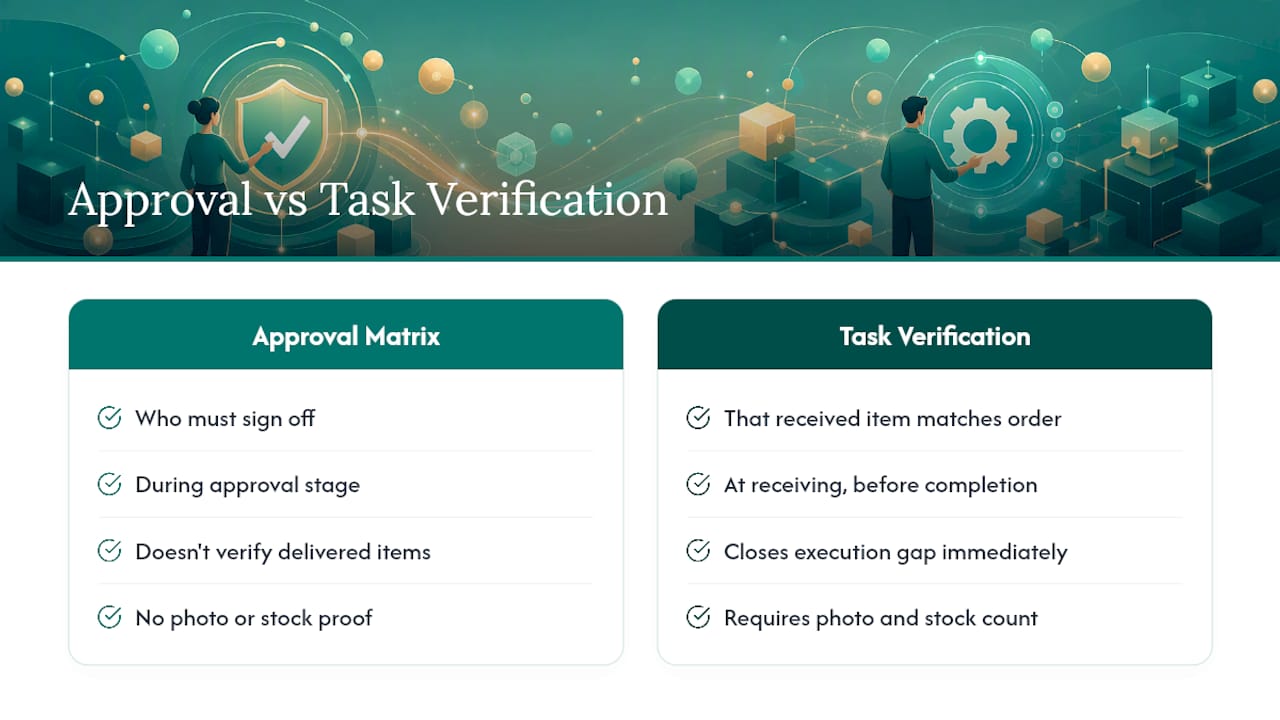
Approval matrices control who signs off on a purchase. They don't control whether the item that arrived actually matches what was ordered, or whether someone logged the stock count that should have triggered the reorder in the first place. That gap is where a lot of retroactive purchasing and invoice mismatches actually start, not in the approval chain itself.
Tying receiving tasks to photo proof and stock counts closes that gap at the point it happens, not weeks later during a reconciliation scramble. When a receiving task requires a photo of the delivered goods before it's marked complete, you've built receipt verification directly into the workflow instead of hoping someone remembers to log it separately.
— Christian
Where Bossy Fits Into Your Purchase Order Workflow
Approval matrices and matching rules only work if someone's actually verifying that goods showed up and stock counts got logged, and that's the piece most PO software leaves to trust. Bossy's task verification closes that gap: receiving tasks require photo proof before they're marked done, so your receipt record backing three-way matching isn't just someone's word for it.

Inventory checks and stock counts feed directly into reorder triggers, so the requisition stage of your workflow starts from real numbers instead of a guess. Every completed task, approval, and count lands in an audit log, giving you the same kind of traceability an ERP approval chain provides, but tied to what actually happened on the floor. For teams juggling receiving across multiple locations, that visibility is often the missing piece between a workflow that looks good on paper and one that holds up during an audit. See how it fits your operation on the Bossy solutions page, or check out Bossy's core features to start a trial.
Sources
Consult Procurify's process guide for the full lifecycle, and APQC's benchmarks for cost targets.
- Purchase Order Process Flow: Step-by-Step Guide from Requisition to Payment
- Walkthrough: setting up and using a purchase approval workflow (Microsoft Learn)
- End-to-End Purchase Order Management Software
- purchase-order-approval-workflow (Zip)
- APQC benchmarking measures: total cost to perform process order