Copy in 5 Minutes: Shift Notes Template for Frontline Managers
Christian MontenegroSeptember 17, 202614 min read
Use one template every time: shift header (date, name, time), tasks completed, outstanding tasks with owners and deadlines, incidents, equipment status, staffing notes, and a one-line handover priority at the top. Copy it into Google Docs or Google Sheets today for a five-minute setup, or use a mobile form if your team needs real-time incident reporting. Start your next shift with it filled out and you'll already be ahead of most teams.
TL;DR:
- Shift notes should be written during the last 10 to 15 minutes of a shift to ensure accuracy and completeness.
- The standard template must include key fields such as handover priority, tasks completed, outstanding tasks with owners and deadlines, incidents, equipment status, staffing notes, and a concise shift summary.
- Digital tools like Google Sheets or forms are preferable for easy searchability, automatic timestamps, and attachment capabilities, especially when involving sensitive data.
- Maintaining strict access controls and anonymizing sensitive information helps keep shift notes secure and compliant with privacy regulations.
- Consistent formatting, writing in plain language, and emphasizing the handover priority at the top significantly improve shift note quality and reliability.
Table of Contents
- Which Shift Notes Template Format Should You Use?
- What Fields Belong in Every Shift Notes Template?
- When Should You Actually Write Your Shift Notes?
- How Do Shift Notes Change by Industry?
- Should Your Team Move Shift Notes Online?
- How Do You Keep Shift Notes Confidential and Secure?
- How Do Shift Notes Fit Into Your Broader Systems?
- What Mistakes Ruin Shift Note Handovers?
- How Do You Get Staff to Actually Use the Template?
- Bossy's Take: Notes Are a Record, Not a To-Do List
- Get Your Shift Notes Off Paper and Into One System
- Sources
- FAQ
Which Shift Notes Template Format Should You Use?
The format matters more than most managers think. A beautiful template nobody opens is worthless, and the right file type depends on who's writing it, how fast they need to write it, and whether anyone needs to search it later.
Google Docs or Google Sheets works best for most small teams. It's free, shareable, editable from a phone, and searchable across months of history. This is your fastest path to a working shift report template today.
Excel earns its keep when a shift produces numbers, not just tasks. A production shift log that tracks hourly output, downtime events, and handover notes side by side gives manufacturing supervisors something Google Sheets handles clumsily: linked calculations across shifts.
Word documents suit teams that print physical copies for a binder or clipboard, though they're the weakest option for anyone trying to search past entries.
PDF works only as a final, locked record, never as a working draft.
Online forms solve a different problem: incident capture. A shift report form forces structure, timestamps every entry automatically, and lets staff attach a photo before they forget.
To roll one out fast:
- Drop your chosen template into a shared drive folder everyone already uses.
- Set edit permissions so only shift leads can delete entries, not just add them.
- If you go with a form, test it on one shift before pushing it company-wide.
What Fields Belong in Every Shift Notes Template?
Eight fields cover almost every industry, and skipping any one of them is usually the reason a handover falls apart.
- Shift header — date, shift lead name, start and end time. This is what makes a note legally useful later, not just a diary entry.
- Shift summary — two sentences on how the shift went overall.
- Tasks completed — specific, not vague ("restocked walk-in cooler," not "did stock").
- Outstanding tasks — always paired with an owner and a deadline, never left open-ended.
- Incidents — what happened, exact time, who was involved.
- Equipment status — anything broken, low, or flagged for maintenance.
- Staffing notes — call-outs, late arrivals, coverage gaps for the next shift.
- Handover priority — the single most important thing the next shift lead needs to know, written first.
Here's what that looks like filled in for a retail closing shift:
Handover priority: Register 3 is down, do not use until IT calls back. Tasks completed: Restocked front displays, closed out register 1 and 2, ran end-of-day report. Outstanding: Return count on damaged inventory, owner: Maria, due by opening tomorrow. Incident: Customer slipped near entrance at 6:40 PM, no injury reported, manager notified. Equipment: Register 3 frozen, IT ticket #4021 filed. Staffing: Jake called out sick for tomorrow's morning shift, still needs coverage.
Notice the audit-friendly detail baked into every line: a timestamp, a name, a ticket number. That's what turns a shift note from a scribble into something OSHA-relevant if an incident ever needs a paper trail, and something HR can pull up if a pattern of call-outs needs a conversation.
When Should You Actually Write Your Shift Notes?
Write during the final 10 to 15 minutes of the shift, not after clocking out and definitely not the next morning from memory. Details fade fast, and a note reconstructed hours later tends to run long, get vague, or miss the one detail that mattered.
- Set a recurring reminder or alarm for 15 minutes before shift end.
- Fill the template in the same order every single day. Consistency is what lets an incoming manager scan for blockers in under five minutes instead of hunting for them.
- Write in plain, factual language. "Freezer temp read 38°F at 4 PM" beats "freezer seemed off again."
- Include timestamps and full names, never initials or "someone."
- Skip opinions about coworkers or customers entirely. Facts only.
- Add verification where the stakes are higher: a photo of damaged inventory, an e-signature for a controlled substance count, or a manager sign-off on anything involving an injury.
Two small rules do more for adoption than any policy memo: make the handover priority field mandatory (no note is "done" without it), and cap the summary at three sentences so nobody dreads writing it.
Pro Tip: Post a laminated one-page version of the template near the time clock. Staff who see the exact format every day stop treating it as optional paperwork and start treating it as part of clocking out.
How Do Shift Notes Change by Industry?
The eight core fields stay the same everywhere, but what fills them shifts hard by industry.
- Restaurants: flag 86'd menu items, note any reservation conflicts for the next shift, and mention equipment issues like a walk-in running warm.
- Healthcare and care settings: log patient or client status changes, medication or care flags, and use an SBAR-style structure (Situation, Background, Assessment, Recommendation) for anything clinically significant.
- Manufacturing: record line downtime minutes, any quality incident with a batch number, and exact material counts at handover.
- Support and care services: note client visit outcomes, progress against care goals, and any risk flags that need immediate follow-up.
The template doesn't change. The vocabulary inside it does.
Should Your Team Move Shift Notes Online?
Paper works until the day someone needs to find a note from three weeks ago and can't. Digital shift notes fix that with a handful of features worth prioritizing over anything flashy.
- Searchable history so a manager can pull up every note mentioning a specific piece of equipment in seconds.
- Photo attachments that let someone verify a broken freezer or a damaged shipment without a physical walkthrough.
- Timestamps that log automatically, removing the "when exactly did this happen" argument.
- E-signatures for anything that needs sign-off, like a controlled inventory count.
- Basic analytics, even just a count of recurring equipment issues over a month.
If your team isn't ready for a full switch, run a hybrid: keep the paper form during the shift, then have whoever closes transfer it into a shared digital sheet within an hour. The minimum viable digital setup is genuinely simple.
How Do You Keep Shift Notes Confidential and Secure?
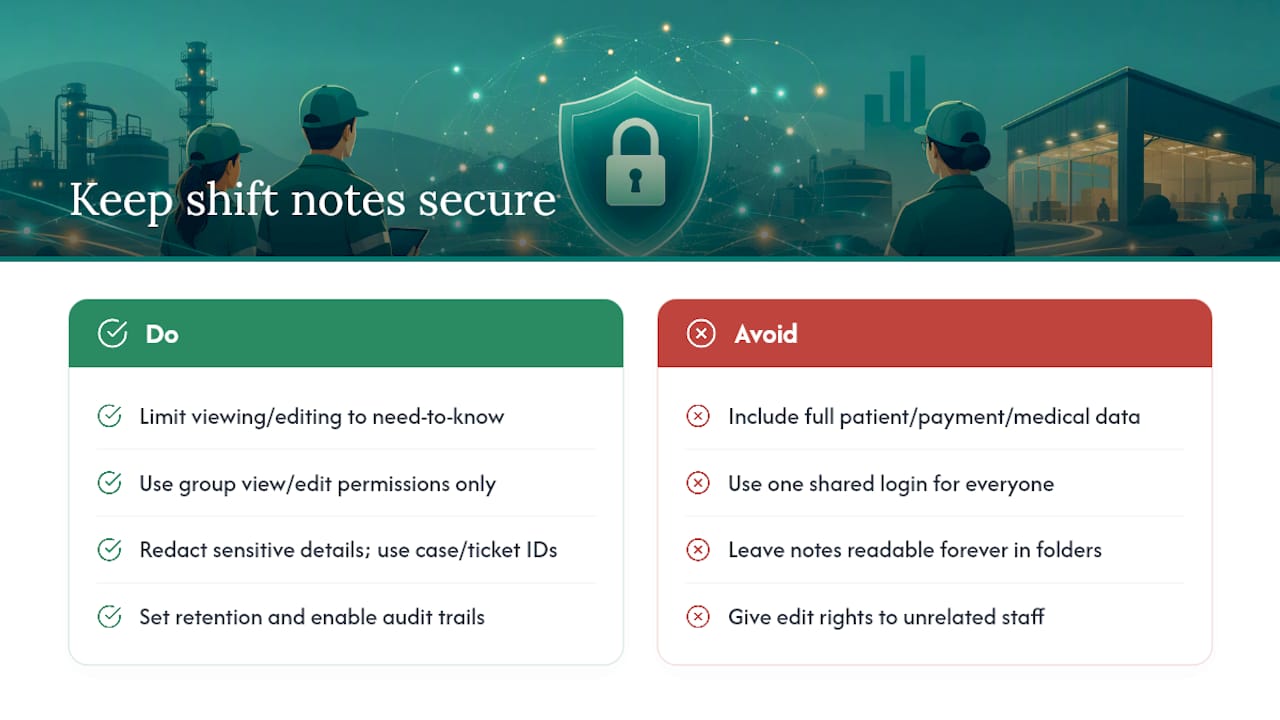
Shift notes often contain names, health details, customer complaints, or security incidents, which makes them more sensitive than most teams treat them. Treat access like you would payroll data, not like a bulletin board.
Limit editing and viewing to people who actually need it. A shift lead doesn't need to see every location's notes, and a part-time hire doesn't need edit access to a note from a shift they weren't on. Most shared drives and form tools let you set view-only versus edit permissions by group, so use that instead of one shared login everyone knows.
Never put full patient names, medical details, or customer payment information directly into a general shift note if your industry has privacy rules attached to that data. Reference a case number or ticket ID instead, and keep the sensitive detail in the system built to hold it, whether that's an electronic health record or a customer service platform.
Set a retention policy. Notes that sit in a shared folder forever, readable by anyone who ever had access, are a liability if there's ever a dispute or an investigation. Decide how long notes stay fully visible (90 days is common) before they get archived to a smaller access group.
Audit trails matter more than most managers realize until they need one. A digital system that logs who edited a note and when protects both the business and the employee if a note's accuracy is ever questioned.
How Do Shift Notes Fit Into Your Broader Systems?
A shift note that lives alone in a notebook or a random Google Doc is disconnected from everything else running your business, and that's the real cost of treating it as a standalone form.
The outstanding tasks field is the natural bridge. An item logged as "unfinished, owner: Maria, due tomorrow" should ideally become an actual assigned task somewhere trackable, not just a line item that gets forgotten if Maria calls out sick. Teams that connect notes to a task system close that loop automatically instead of relying on the next shift lead to remember to follow up.
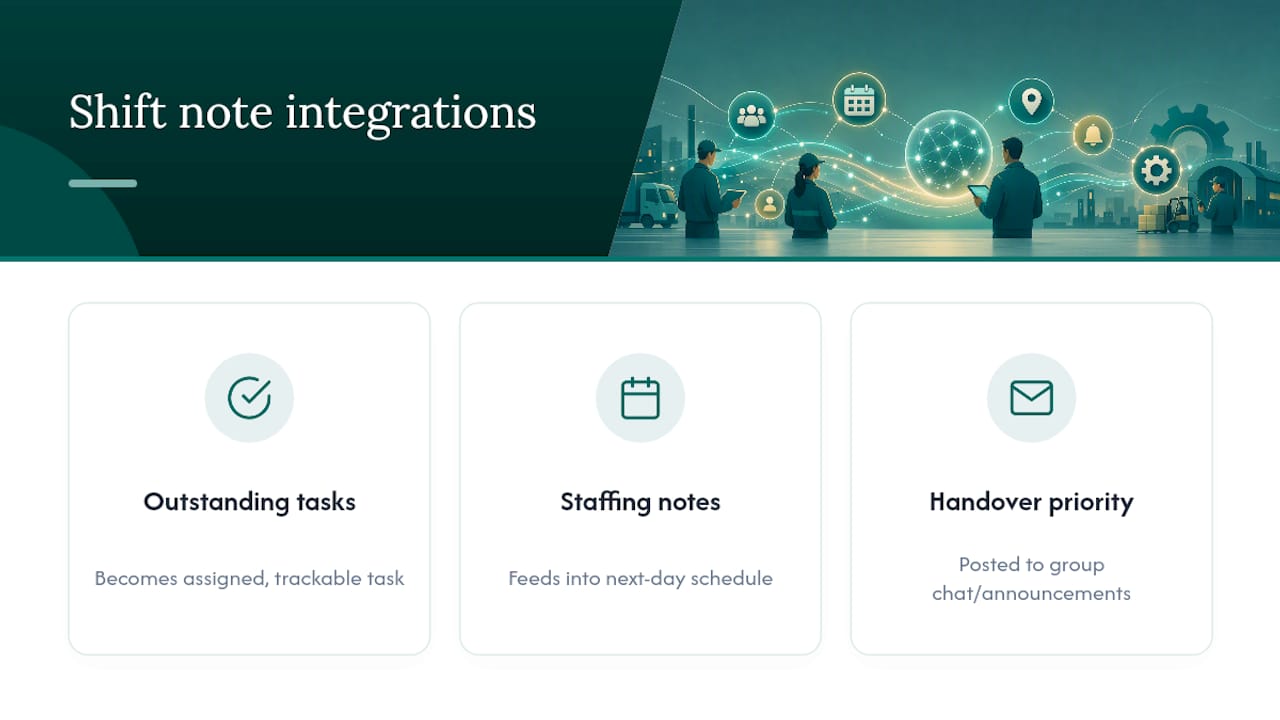
Staffing notes connect just as directly to scheduling. A call-out logged in tonight's shift note should feed straight into tomorrow's schedule instead of getting rediscovered at 6 AM when nobody shows up.
Communication tools matter here too. If your team already uses group chats or announcements for daily coordination, the shift note's handover priority line is exactly the kind of thing worth pushing into that channel automatically, not buried in a document nobody checks until their shift starts.
The goal isn't a fancier note. It's fewer places information can get stuck.
What Mistakes Ruin Shift Note Handovers?
The most common failure isn't a missing field. It's writing the note too late.
Notes written the next morning, or reconstructed from memory after clocking out, consistently run longer and get less accurate. The detail that mattered, a customer complaint, an odd noise from a machine, gets lost because nobody wrote it down in the moment.
Vague language is the second killer. "Handled the issue" tells the next shift nothing. "Fixed the leak under sink 2, plumber not needed" tells them everything. Train staff to write like they're explaining it to a stranger who wasn't there, because that's exactly who's reading it.
Skipping the handover priority field, or burying it at the bottom instead of the top, is the third. If the most urgent thing is on line 12 of a wall of text, most incoming staff will miss it during a rushed shift change.
Inconsistent format is the quiet one. When every shift lead uses a different structure, the incoming manager has to relearn how to read the note every single day instead of scanning it in seconds.
Fixing all four comes down to the same habit: same template, written in the last 15 minutes, in plain language, with priority at the top.
How Do You Get Staff to Actually Use the Template?
Adoption fails when training is one email with an attachment nobody opens. It works when the template becomes muscle memory within the first week.
Run a live walkthrough during a shift change instead of explaining it in a meeting room. Watching a real handover happen while filling out the template together teaches the timing and tone faster than any written guide.
Give new hires a filled-in example, not a blank form. Seeing what "good" looks like, specific tasks, real timestamps, a clear priority line, sets the bar immediately instead of letting people guess.
Check the first five notes a new employee writes and give direct feedback. This is where vague phrasing gets caught early instead of becoming a habit.
Make the handover priority field impossible to skip, whether that's a required field on a digital form or a manager who won't accept a note without it. Consistency gets enforced through the process, not through a poster on the wall. Building better opening and closing routines around the same discipline makes the shift note itself feel like less of an extra step.
Bossy's Take: Notes Are a Record, Not a To-Do List
A shift note that disappears into a notebook is just a diary entry. The moment you standardize it and make it checkable, it becomes an operational record, one that supports HR conversations, safety reviews, and the kind of organizational health tracking that actually improves how a team runs. Bossy's approach treats every logged task the same way: tied to a goal, verified, not just assumed done.
— Christian
Get Your Shift Notes Off Paper and Into One System
Bossy replaces the notebook, the group chat, and the spreadsheet with one place your team already checks. Tasks get assigned with photo proof required before they're marked complete, schedules show call-outs the moment they happen, and every past shift note stays searchable instead of buried in a drawer.

For frontline teams juggling handovers across multiple shifts, the Features page shows how checklists, scheduling, and an approval queue work together so a manager never has to take a task's completion on faith. Restaurants and hospitality teams specifically can see how it maps to service shifts on the restaurant solutions page. Every plan starts on the pricing page, where current prices and plan details are available for Free, Operations, Growth, and other plans. Open a free account today and run your next shift handover inside Bossy instead of a notebook that only one person can read at a time.
Sources
- Shift Notes: How to Run Clean Shift Handovers | FirstHR
- Production Shift Log Template | Free Download and Shift Handover Sample | Finite Field
- OSHA common statistics
- Shift Report Form Template | Typeform
FAQ
What Is the Best App for Shift Notes?
There's no single best app, it depends on whether you need simple text handovers or task verification with photo proof. Teams that want notes tied directly to accountability and completed work tend to outgrow a plain notes app fast, which is why platforms like Bossy pair shift logging with task checklists and approval queues in one place.
Can You Provide an Example of a Shift Note?
A solid shift note leads with the handover priority ("Register 3 is down, do not use"), then lists tasks completed, outstanding items with an owner and deadline, any incidents with a timestamp, and equipment status. The filled example above shows the full structure for a retail closing shift.
Where Can I Find Free Shift Schedule Templates?
Google Sheets and Google Docs both offer free, editable templates you can copy directly into a shared drive within minutes. For production or manufacturing environments, a free Excel production shift log adds hourly output and downtime tracking on top of the basic schedule.
Do All Jobs Require Shift Notes?
Not legally in most cases, but any job involving handoffs between staff, equipment, or safety concerns benefits from them regardless of industry. Healthcare, manufacturing, and hospitality roles carry the strongest case for consistent notes since incidents there often tie back to OSHA reporting standards.