Team Huddle Agenda: Four Part Script and Task Verification
Christian MontenegroSeptember 2, 202614 min read
The strongest team huddle agenda has four parts: one piece of good news, two or three metrics, a single top priority, and a quick call for blockers. Run it in about 10 minutes with time allocated for good news, metrics, top priority, blockers, and closing. For longer sessions, additional elements and buffer time may be included. Do it daily, same time, same order.
TL;DR:
- Teams should enforce a strict five-question format, limiting responses to specific prompts like good news, key metrics, and blockers, to keep meetings focused.
- Starting huddles on time every day, with a visible timer and dedicated facilitator, is essential for building consistent habits and short, effective sessions.
- Huddles must include a shared visual dashboard or whiteboard to ensure everyone sees the same data and prevent discussions from dragging on in remote or hybrid settings.
- Blocking troubleshooting conversations and capturing action items with owners and deadlines help ensure issues are resolved outside the huddle and improve follow-through.
- For larger teams, split into sub-huddles and keep a brief sync afterward to maintain engagement and prevent meetings from becoming long and unproductive.
Table of Contents
- What Is a Team Huddle Agenda?
- Ready-to-Use Agenda Templates for Every Team Size
- What Goes in Each Agenda Item, Word for Word
- Who Runs It, and What Do They Need
- Running Huddles for Remote and Hybrid Teams
- Keeping Huddles Fast Without Losing Substance
- Capturing Action Items and Measuring What the Huddle Actually Changed
- Copy-Paste Scripts and a Five-Day Cadence
- How Bossy Turns Huddle Talk Into Verified Work
- What Changed When We Actually Enforced the Hard Start Rule
- Run Your Huddles Where the Follow-Through Actually Lives
- Sources
- FAQ
What Is a Team Huddle Agenda?
A team huddle agenda is the fixed running order for a short, standing team check-in, usually daily or every morning, that lasts between 5 and 15 minutes. It exists to answer one question fast: is today on track, and what's in the way?
Practiced teams tend to settle around 10 to 12 minutes once the agenda becomes muscle memory. That consistency is the point. A huddle done the same way every day builds a habit faster than a longer meeting that changes shape week to week.
Run well, a huddle delivers:
- Alignment on the day's single most important task, not a laundry list of ten
- Early detection of blockers before they cost a full day of lost work
- Accountability, because owners speak their own updates out loud in front of the team
- Morale, since a quick win or good-news item at the start sets a different tone than a status report ever could
Skip any of these and the huddle drifts into a status meeting nobody wants to attend.
Ready-to-Use Agenda Templates for Every Team Size
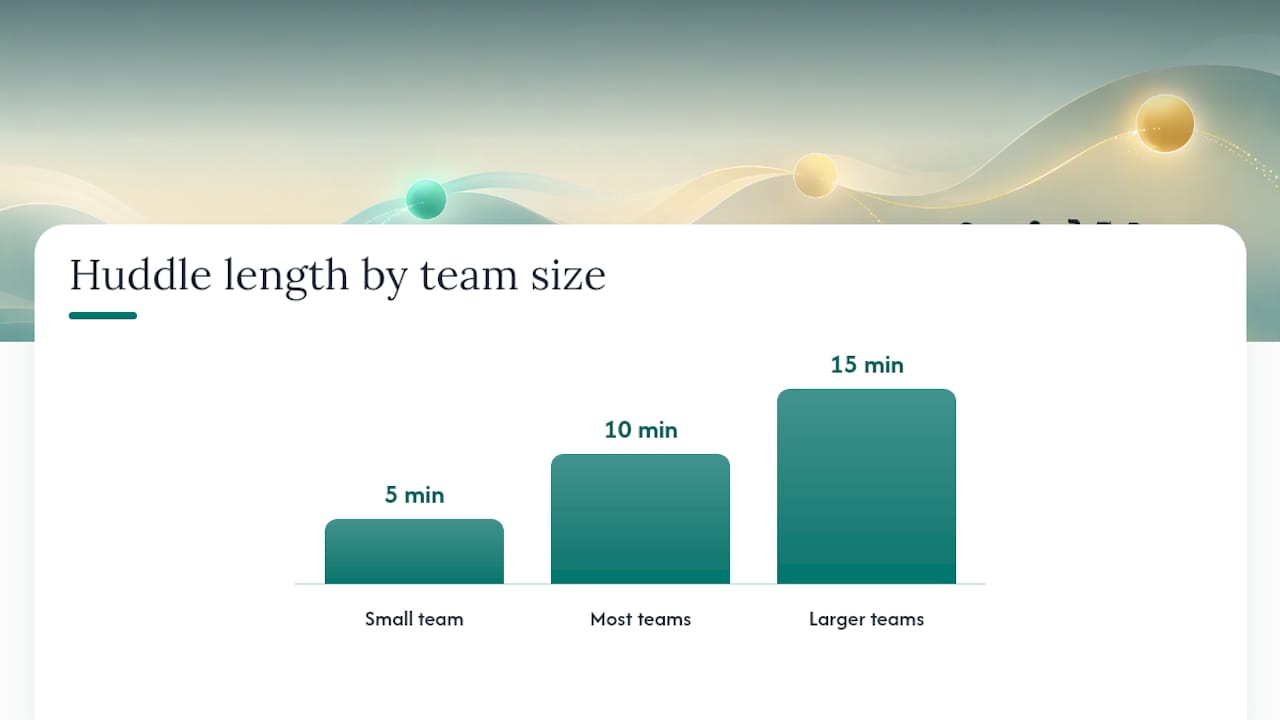
The right length depends on team size and how appointment-driven the work is. A 10-minute morning huddle built around priorities, schedule review, and anticipated challenges is common in front-desk and appointment-based operations. Bigger or more complex teams often need the extra five minutes.
5-minute huddle (small team, tight schedule)
- Good news (30 seconds)
- Top priority for the day, one per person or per station (2.5 minutes)
- Blockers, name only, no discussion (2 minutes)
10-minute huddle (most teams, most days)
- Good news (1 minute)
- Two or three key metrics, read from a dashboard, not memory (2 minutes)
- Single top priority per person or sub-team (2 minutes)
- Blockers named and owned (4 minutes)
- Close and restate the day's focus (1 minute)
15-minute huddle (larger teams or Monday resets) Add a 30-second quick-win round after good news, and add a minute of buffer at the end for anything urgent that surfaced late.
Assign a facilitator, and rotate that role weekly rather than always defaulting to the manager. Rotation spreads ownership of the habit across the team instead of making concise reporting one person's job. Once a huddle group grows past 12 to 15 people, split it. A single huddle covering three departments stops being a huddle; it becomes a briefing, and briefings tolerate the length problems huddles are built to avoid.
Pro Tip: Print the agenda and tape it to the wall or pin it in your team chat. When someone drifts off-topic, point at it instead of interrupting them yourself. It depersonalizes the redirect.
What Goes in Each Agenda Item, Word for Word
Vague prompts get vague answers. Specific prompts get specific ones. Use exact phrasing for each item and hold everyone to a time limit per response, not just a limit for the whole huddle.
- Good news: "One thing that went well since yesterday?" Fifteen seconds per person, no exceptions.
- Metrics: "Where do we stand on [the two or three numbers that matter today]?" Point at a screen or whiteboard instead of reciting figures from memory.
- Top priority: "What is the one thing you need to finish today?" One sentence. Not three tasks disguised as one.
- Blockers: "What's stopping you, and who can unblock it?" Name it and name an owner. Don't solve it here.
Teams following a three- or four-question format report shorter, more focused updates than open-ended status rounds produce.
A visible metrics dashboard does more work than most leaders expect. Reading numbers off a screen takes seconds; reciting them from memory invites hedging, rounding, and disagreement about what the real figure even was.
Blockers need a rule of their own: name it, assign an owner, and move discussion out of the huddle entirely. The moment two people start troubleshooting a blocker in front of the group, the 10-minute huddle becomes a 25-minute meeting with everyone else sitting through a conversation that has nothing to do with them.
Who Runs It, and What Do They Need
A huddle needs a facilitator, a consistent time and place, and something visual for the team to look at together. Skip any of those three and the huddle loses shape within a week.
The facilitator checklist is short but non-negotiable:
- Start on time, even if half the team isn't in the room yet
- Enforce the timebox out loud ("30 seconds on this one, let's move")
- Capture every blocker with a name and an owner before moving to the next item
- Close with a one-line recap of the day's top priority
For the visual anchor, a live metrics dashboard beats a printed report every time, and a shared doc or whiteboard works fine if a dashboard isn't available yet. What matters is that everyone looks at the same numbers at the same moment instead of comparing notes after the fact.
Attendance stays simple for teams under 12 people: everyone shows up, every day. Past that size, split into sub-huddles by shift, station, or function, then have facilitators sync briefly afterward on anything that crosses groups.
Running Huddles for Remote and Hybrid Teams
Distributed teams need a few rules that in-person huddles get for free. Set a fixed meeting link that never changes, publish the huddle time in each attendee's own time zone, and require cameras on. Camera-off huddles turn into a facilitator talking to a muted grid, and engagement drops fast.
Beyond that:
- Pin the agenda in the video call chat or team channel before the huddle starts
- Keep a shared doc open on-screen for metrics and blockers, so remote and in-room people see the same thing
- Assign a note-taker separate from the facilitator, since running the meeting and typing at the same time rarely works well
For teams spread across wide time zones, a daily live sync stops making sense for everyone. Combining an async standup tool with two or three live huddles a week preserves rhythm without forcing someone to join at 6 a.m. every day. Async updates cover the routine items; live huddles handle anything that benefits from real conversation, like a blocker that needs quick back-and-forth.
Keeping Huddles Fast Without Losing Substance
The single biggest reason huddles fail isn't a bad agenda. It's a manager who lets the meeting run long once, then again, then it's a 25-minute daily habit nobody enjoys.
- Start on time, no exceptions. Modeling this for several weeks is what actually builds the habit, not a memo about punctuality.
- Use a visible timer. A phone timer on the table or a countdown on the shared screen does more to enforce pace than any verbal reminder.
- Ban problem-solving in the room. Blockers get named and owned, then handled in a separate, smaller conversation right after.
- Cap attendance. More people means more turns to take, and more turns means the 10-minute huddle quietly becomes 20.
If a huddle derails anyway, the fastest recovery is naming it out loud: "Let's take this offline, back to blockers." That single sentence, repeated consistently, retrains a team faster than any rewritten agenda document.
Pro Tip: If a huddle runs long three days in a row, don't just remind people to be brief. Cut the time slot by two minutes on the calendar. Constraints change behavior faster than requests do.
Capturing Action Items and Measuring What the Huddle Actually Changed
A huddle that surfaces five blockers and resolves none of them by Friday isn't working, no matter how tight the agenda looks. Close every huddle with a quick capture step: owner, deadline, and the channel where the update will land (team chat, task board, whatever your team already checks).
The strict rule against solving blockers live only works if there's a real follow-up mechanism behind it. Otherwise, "let's take it offline" becomes a polite way of letting problems disappear.
A few simple metrics tell you whether the huddle is earning its 10 minutes:
| Metric | What it tells you | Target to watch for |
|---|---|---|
| Time adherence | Whether the huddle actually ends on schedule | Consistently on time within 1 to 2 minutes |
| Blocker resolution SLA | How long a named blocker sits before it's cleared | Shrinking week over week |
| Action completion rate | Percentage of assigned owners who close their item by the stated deadline | Trending upward, not flat |
Tie the huddle's daily output to your weekly or monthly review. A good task verification process closes the loop between what someone said they'd do in the huddle and whether it actually got done, which is where most daily meetings quietly lose their teeth.
Copy-Paste Scripts and a Five-Day Cadence
Ready-made templates remove the friction that kills new habits in week one. Structured, repeatable formats make it easier to keep a huddle consistent long enough for it to actually change behavior.
Calendar invite text, 10-minute version: "Daily Huddle: Good news, metrics, top priority, blockers. 10 minutes, starts on time. Bring your #1 task for today."
Calendar invite text, 15-minute version: "Daily Huddle: Good news + quick win, metrics, top priority, blockers, 1-minute buffer. 15 minutes, cameras on for remote."
Facilitator opening line: "Good morning, team. Quick huddle, same four items. Who's got good news?"
Facilitator closing line: "Priority for today is [X]. Blockers are owned. Let's go."
A five-day cadence with light variation:
- Monday: Extra two minutes for a metrics deep-dive on last week's numbers
- Tuesday through Thursday: Standard 10-minute format
- Friday: Add a 1-minute round on what to carry into next week
How Bossy Turns Huddle Talk Into Verified Work
A huddle only matters if what gets said in it actually happens. That's the gap between a good agenda and a good outcome, and it's where most daily meetings quietly break down.
When a top priority gets named out loud, it needs a place to live that isn't just someone's memory. Cascading goals connect that daily priority back to a weekly or monthly target, so the huddle stops being a standalone ritual and starts functioning as the daily checkpoint for something bigger. Task verification, whether that's a photo of completed work or a manager approval step, closes the loop the huddle opens: you find out not just that someone said they'd handle a blocker, but that they actually did.
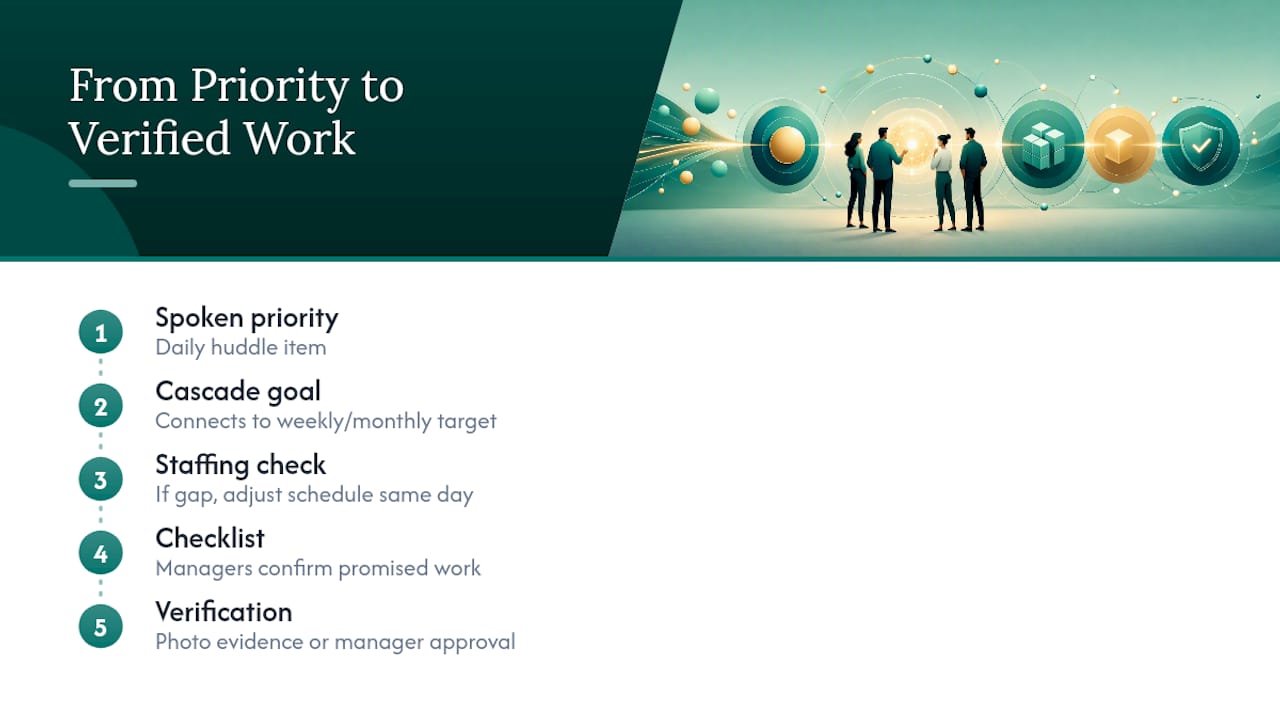
For frontline teams juggling shift changes, scheduling resilience matters just as much as the huddle itself. A huddle that surfaces a staffing gap is only useful if the schedule can absorb the fix that same day. Checklists tied to the huddle's stated priority give managers a way to confirm the day's real work matches what got promised at 8 a.m.
What Changed When We Actually Enforced the Hard Start Rule
The hardest part of running a daily huddle isn't writing the agenda. It's holding the line on the start time when half the team is running five minutes late, every single day, for the first two weeks.
Expect the first week to feel forced. People show up unsure what to say for "good news," and blockers get named vaguely because naming them precisely is a skill, not an instinct. By the first month, the shift shows up in how fast people answer, not in how much they say. The one habit worth protecting above all others: start on time regardless of who's in the room. Everything else about a huddle can be adjusted. That one rule is what makes the whole thing stick.
— Christian
Run Your Huddles Where the Follow-Through Actually Lives
Bossy is built for the exact gap this article keeps circling back to: the huddle names a priority and a blocker, and then someone has to know whether it actually got handled. Bossy connects that daily conversation to real task verification, so a manager isn't left guessing whether "I'll fix it today" turned into a finished job. Cascading goals mean the priority named in this morning's huddle ties directly back to the team's weekly targets, instead of floating on its own.

If your team runs restaurants, retail floors, or any frontline operation where the morning huddle sets the tone for the whole shift, Bossy's restaurant and retail tools are built around exactly that rhythm, checklists, photo-verified tasks, and dashboards that display the same numbers you're already reading aloud in your huddle. See how it fits your team by checking out Bossy's features or starting with the main platform today.
Sources
- Team Huddle: Complete Guide With Agenda & Templates
- Daily Huddle: Everything You Need For a Great Huddle Meeting
- 10 Ideas for a Productive Morning Huddle
FAQ
What Should We Talk About in a Team Huddle?
Stick to four things: one piece of good news, two or three key metrics, the single top priority for the day, and any blockers, named with an owner attached.
What Belongs on a Team Meeting Agenda?
A huddle agenda stays narrow on purpose: good news, metrics read from a dashboard, one priority per person, and blockers captured for follow-up, not solved on the spot.
How Do You Structure a Team Huddle?
Open with good news to set the tone, move through metrics visually rather than from memory, have each person or sub-team name one priority, then close with blockers and a one-line recap, all within 5 to 15 minutes.
What Goals Should We Discuss During a Shift Huddle?
Focus on the single most important task for that shift per person or station, not a running list, and pair it with any staffing or scheduling gaps that could stop it from getting done.
Can Software Help Run and Track Huddles?
A platform like Bossy can turn the priorities and blockers named in a huddle into verified tasks and goals, so managers see follow-through instead of relying on memory alone.